<!DOCTYPE html>
	<html lang="vi" xmlns="http://www.w3.org/1999/xhtml" prefix="og: http://ogp.me/ns#">
	<head>
<title>RAM ảo là gì? Set RAM ảo trên Windows 10 như thế nào là hợp lý?</title>
<meta name="description" content="RAM ảo là gì? Set RAM ảo trên Windows 10 như thế nào là hợp lý? - Savefile - Windows -...">
<meta name="keywords" content="windows">
<meta name="news_keywords" content="windows">
<meta name="author" content="Trường thcs Trần Quang Khải">
<meta name="copyright" content="Trường thcs Trần Quang Khải &#91;phavaphu@gmail.com&#93;">
<meta name="robots" content="index, archive, follow, noodp">
<meta name="googlebot" content="index,archive,follow,noodp">
<meta name="msnbot" content="all,index,follow">
<meta name="google-site-verification" content="RcwYmWMVb8dh-0VdAvXEp4IOHtTN12pffjnuI5mDK1o">
<meta name="generator" content="NukeViet v4.0">
<meta http-equiv="Content-Type" content="text/html; charset=utf-8">
<meta property="article:author" content="http://thcstranquangkhai.edu.vn">
<meta property="og:title" content="RAM ảo là gì? Set RAM ảo trên Windows 10 như thế nào là hợp lý?">
<meta property="og:type" content="website">
<meta property="og:description" content="Savefile - Windows - https&#x3A;&#x002F;&#x002F;thcstranquangkhai.edu.vn&#x002F;index.php&#x002F;vi&#x002F;windows&#x002F;savefile&#x002F;Windows&#x002F;ram-ao-la-gi-set-ram-ao-tren-windows-10-nhu-the-nao-la-hop-ly-298.html">
<meta property="og:site_name" content="Trường thcs Trần Quang Khải">
<meta property="og:url" content="https://thcstranquangkhai.edu.vn/index.php/vi/windows/Windows/ram-ao-la-gi-set-ram-ao-tren-windows-10-nhu-the-nao-la-hop-ly-298.html">
<link rel="shortcut icon" href="https://thcstranquangkhai.edu.vn/uploads/favicon.ico">
<link rel="canonical" href="https://thcstranquangkhai.edu.vn/index.php/vi/windows/Windows/ram-ao-la-gi-set-ram-ao-tren-windows-10-nhu-the-nao-la-hop-ly-298.html">
<link rel="alternate" href="https://thcstranquangkhai.edu.vn/index.php/vi/windows/rss/" title="Windows" type="application/rss+xml">
<link rel="alternate" href="https://thcstranquangkhai.edu.vn/index.php/vi/windows/rss/thuat-thuat-bai-giang-van-phong/" title="Windows - Thuật thuật Bài giảng - Văn phòng" type="application/rss+xml">
<link rel="alternate" href="https://thcstranquangkhai.edu.vn/index.php/vi/windows/rss/bai-giang-e-learning/" title="Windows - Bài giảng E_Learning" type="application/rss+xml">
<link rel="alternate" href="https://thcstranquangkhai.edu.vn/index.php/vi/windows/rss/tai-lieu-su-dung-phan-mem-soan-giang-e-learning/" title="Windows - Tài liệu sử dụng phần mềm soạn giảng E_Learning" type="application/rss+xml">
<link rel="alternate" href="https://thcstranquangkhai.edu.vn/index.php/vi/windows/rss/Tin-cong-nghe/" title="Windows - Microsoft PowerPoint" type="application/rss+xml">
<link rel="alternate" href="https://thcstranquangkhai.edu.vn/index.php/vi/windows/rss/microsoft-word/" title="Windows - Microsoft Word" type="application/rss+xml">
<link rel="alternate" href="https://thcstranquangkhai.edu.vn/index.php/vi/windows/rss/microsoft-excel/" title="Windows - Microsoft Excel" type="application/rss+xml">
<link rel="alternate" href="https://thcstranquangkhai.edu.vn/index.php/vi/windows/rss/vnedu-phan-mem-nhap-diem/" title="Windows - VnEdu &#40;Phần mềm nhập điểm&#41;" type="application/rss+xml">
<link rel="alternate" href="https://thcstranquangkhai.edu.vn/index.php/vi/windows/rss/Thu-thuat-khac/" title="Windows - Thủ thuật khác" type="application/rss+xml">
<link rel="alternate" href="https://thcstranquangkhai.edu.vn/index.php/vi/windows/rss/thu-thuat-phan-mem-internet/" title="Windows - Thủ thuật Phần mềm - Internet" type="application/rss+xml">
<link rel="alternate" href="https://thcstranquangkhai.edu.vn/index.php/vi/windows/rss/proshow-proceducer/" title="Windows - Proshow Proceducer" type="application/rss+xml">
<link rel="alternate" href="https://thcstranquangkhai.edu.vn/index.php/vi/windows/rss/internet/" title="Windows - Internet" type="application/rss+xml">
<link rel="alternate" href="https://thcstranquangkhai.edu.vn/index.php/vi/windows/rss/nukeviet/" title="Windows - NukeViet" type="application/rss+xml">
<link rel="alternate" href="https://thcstranquangkhai.edu.vn/index.php/vi/windows/rss/thu-thuat-blogspot/" title="Windows - Thủ thuật Blogspot" type="application/rss+xml">
<link rel="alternate" href="https://thcstranquangkhai.edu.vn/index.php/vi/windows/rss/thu-thuat-usb/" title="Windows - Thủ thuật USB" type="application/rss+xml">
<link rel="alternate" href="https://thcstranquangkhai.edu.vn/index.php/vi/windows/rss/thu-thuat-youtube/" title="Windows - Thủ thuật Youtube" type="application/rss+xml">
<link rel="alternate" href="https://thcstranquangkhai.edu.vn/index.php/vi/windows/rss/Download-Upload/" title="Windows - Download - Upload" type="application/rss+xml">
<link rel="alternate" href="https://thcstranquangkhai.edu.vn/index.php/vi/windows/rss/may-chieu-projector/" title="Windows - Máy chiếu - Projector" type="application/rss+xml">
<link rel="alternate" href="https://thcstranquangkhai.edu.vn/index.php/vi/windows/rss/photoshop/" title="Windows - Photoshop" type="application/rss+xml">
<link rel="alternate" href="https://thcstranquangkhai.edu.vn/index.php/vi/windows/rss/driver/" title="Windows - Driver" type="application/rss+xml">
<link rel="alternate" href="https://thcstranquangkhai.edu.vn/index.php/vi/windows/rss/mang-xa-hoi/" title="Windows - Mạng xã hội" type="application/rss+xml">
<link rel="alternate" href="https://thcstranquangkhai.edu.vn/index.php/vi/windows/rss/Windows/" title="Windows - Windows" type="application/rss+xml">
<link rel="alternate" href="https://thcstranquangkhai.edu.vn/index.php/vi/windows/rss/phan-mem-soan-bai-giang-elearning/" title="Windows - Phần mềm soạn bài giảng Elearning" type="application/rss+xml">
<link rel="alternate" href="https://thcstranquangkhai.edu.vn/index.php/vi/windows/rss/San-pham/" title="Windows - Phần mềm SGK tin THCS" type="application/rss+xml">
<link rel="alternate" href="https://thcstranquangkhai.edu.vn/index.php/vi/windows/rss/phan-mem-tin-lop-6/" title="Windows - Phần mềm Tin lớp 6" type="application/rss+xml">
<link rel="alternate" href="https://thcstranquangkhai.edu.vn/index.php/vi/windows/rss/phan-mem-tin-lop-7/" title="Windows - Phần mềm Tin lớp 7" type="application/rss+xml">
<link rel="alternate" href="https://thcstranquangkhai.edu.vn/index.php/vi/windows/rss/phan-mem-tin-lop-8/" title="Windows - Phần mềm Tin lớp 8" type="application/rss+xml">
<link rel="alternate" href="https://thcstranquangkhai.edu.vn/index.php/vi/windows/rss/phan-mem-tin-lop-9/" title="Windows - Phần mềm Tin lớp 9" type="application/rss+xml">
<link rel="alternate" href="https://thcstranquangkhai.edu.vn/index.php/vi/windows/rss/phan-mem-tin-danh-cho-tieu-hoc/" title="Windows - Phần mềm tin dành cho Tiểu học" type="application/rss+xml">
<link rel="alternate" href="https://thcstranquangkhai.edu.vn/index.php/vi/windows/rss/phan-mem-tin-danh-cho-mam-non/" title="Windows - Phần mềm tin dành cho Mầm non" type="application/rss+xml">
<link rel="alternate" href="https://thcstranquangkhai.edu.vn/index.php/vi/windows/rss/giang-day-hoc-tap/" title="Windows - Giảng dạy - Học tập" type="application/rss+xml">
<link rel="alternate" href="https://thcstranquangkhai.edu.vn/index.php/vi/windows/rss/phan-mem-tap-huan/" title="Windows - Phần mềm tập huấn" type="application/rss+xml">
<link rel="alternate" href="https://thcstranquangkhai.edu.vn/index.php/vi/windows/rss/ung-dung-van-phong/" title="Windows - Ứng dụng Văn phòng" type="application/rss+xml">
<link rel="alternate" href="https://thcstranquangkhai.edu.vn/index.php/vi/windows/rss/phan-mem-phavaphu/" title="Windows - Phần mềm phavaphu" type="application/rss+xml">
<link rel="alternate" href="https://thcstranquangkhai.edu.vn/index.php/vi/windows/rss/he-dieu-hanh/" title="Windows - Hệ điều hành" type="application/rss+xml">
<link rel="alternate" href="https://thcstranquangkhai.edu.vn/index.php/vi/windows/rss/phan-mem-khac/" title="Windows - Phần mềm khác" type="application/rss+xml">
<link rel="alternate" href="https://thcstranquangkhai.edu.vn/index.php/vi/windows/rss/qt/" title="Windows - QT" type="application/rss+xml">
<link rel="alternate" href="https://thcstranquangkhai.edu.vn/index.php/vi/windows/rss/ban-ghost-win/" title="Windows - Bản Ghost Win" type="application/rss+xml">
<link rel="alternate" href="https://thcstranquangkhai.edu.vn/index.php/vi/windows/rss/lap-trinh-di-dong/" title="Windows - Lập trình di động" type="application/rss+xml">
<link rel="preload" as="script" href="https://thcstranquangkhai.edu.vn/assets/js/jquery/jquery.min.js">
<link rel="preload" as="script" href="https://thcstranquangkhai.edu.vn/themes/defaultphavaphu/js/wow.js">
<link rel="preload" as="script" href="https://thcstranquangkhai.edu.vn/themes/defaultphavaphu/js/wow.min.js">
<link rel="preload" as="script" href="https://thcstranquangkhai.edu.vn/themes/defaultphavaphu/js/theia-sticky-sidebar.js">
<link rel="preload" as="script" href="https://thcstranquangkhai.edu.vn/assets/js/language/vi.js">
<link rel="preload" as="script" href="https://thcstranquangkhai.edu.vn/assets/js/global.js">
<link rel="preload" as="script" href="https://thcstranquangkhai.edu.vn/themes/defaultphavaphu/js/news.js">
<link rel="preload" as="script" href="https://thcstranquangkhai.edu.vn/assets/js/jquery/jquery.cookie.js">
<link rel="preload" as="script" href="https://thcstranquangkhai.edu.vn/themes/defaultphavaphu/js/main.js">
<link rel="preload" as="script" href="https://thcstranquangkhai.edu.vn/themes/defaultphavaphu/js/custom.js">
<link rel="preload" as="script" href="https://thcstranquangkhai.edu.vn/themes/defaultphavaphu/js/bootstrap.min.js">
<link rel="StyleSheet" href="https://thcstranquangkhai.edu.vn/assets/css/font-awesome.min.css">
<link rel="StyleSheet" href="https://thcstranquangkhai.edu.vn/themes/defaultphavaphu/css/bootstrap.non-responsive.css">
<link rel="StyleSheet" href="https://thcstranquangkhai.edu.vn/themes/defaultphavaphu/css/style.css">
<link rel="StyleSheet" href="https://thcstranquangkhai.edu.vn/themes/defaultphavaphu/css/style.non-responsive.css">
<link rel="StyleSheet" href="https://thcstranquangkhai.edu.vn/themes/defaultphavaphu/css/news.css">
<link rel="StyleSheet" href="https://thcstranquangkhai.edu.vn/assets/css/defaultphavaphu.vi.0.css?t=77">
<link href="https://thcstranquangkhai.edu.vn/themes/defaultphavaphu/css/animate.css" rel="stylesheet">
<style>
	body{background: #fff;}
</style>
		<!-- BEGIN: thông báo đẩy js -->
		<!-- END: thông báo đẩy js -->
<script data-show="inline">(function(i,s,o,g,r,a,m){i['GoogleAnalyticsObject']=r;i[r]=i[r]||function(){
(i[r].q=i[r].q||[]).push(arguments)},i[r].l=1*new Date();a=s.createElement(o),
m=s.getElementsByTagName(o)[0];a.async=1;a.src=g;m.parentNode.insertBefore(a,m)
})(window,document,'script','https://www.google-analytics.com/analytics.js','ga');
ga('create', 'UA-81359612-1', '.thcstranquangkhai.edu.vn');
ga('send', 'pageview');
</script>
</head>
	<body>
<div id="print">
	<div id="hd_print">
		<h2 class="pull-left">Trường thcs Trần Quang Khải</h2>
		<p class="pull-right"><a title="Trường thcs Trần Quang Khải" href="https://thcstranquangkhai.edu.vn/">https://thcstranquangkhai.edu.vn</a></p>
	</div>
	<div class="clear"></div>
	<hr />
	<div id="content">
		<h1>RAM ảo là gì? Set RAM ảo trên Windows 10 như thế nào là hợp lý?</h1>
		<ul class="list-inline">
			<li>Thứ hai - 18/06/2018 15:53</li>
			<li class="hidden-print txtrequired"><em class="fa fa-print">&nbsp;</em><a title="In ra" href="javascript:;" onclick="window.print()">In ra</a></li>
			<li class="hidden-print txtrequired"><em class="fa fa-power-off">&nbsp;</em><a title="Đóng cửa sổ này" href="javascript:;" onclick="window.close()">Đóng cửa sổ này</a></li>
		</ul>
		<div class="clear"></div>
		<div id="hometext">
						<div class="pull-left imghome">
				<img alt="RAM ảo là gì? Set RAM ảo trên Windows 10 như thế nào là hợp lý?" src="https://thcstranquangkhai.edu.vn/assets/windows/2018_06/performance-options-min.jpg" width="100" class="img-thumbnail" />
			</div>
			Windows 10 hiện nay với nhiều bản cập nhật đem tới cho chúng ta giao diện mới mẻ và đẹp lung linh, nhưng đi kèm với đều đó thì hiển nhiên đối với các dòng máy tính có dung lượng RAM ít thì việc ngốn RAM là điều có thể, dẫn đến máy tính hoạt động chậm chạp. Vì thế vị cứu tinh của máy tính có dung lượng RAM thấp chắc hẳn các bạn cũng đã biết đó là “RAM ảo”.
		</div>
		<div id="bodytext" class="clearfix">
			<h2>Vậy RAM ảo là gì?</h2>

<p>RAM ảo là một bộ nhớ đệm hoạt động song song với RAM vật lý,&nbsp;được sử dụng khi RAM vật lý đã được sử dụng hết (hoặc hỗ trợ sử dụng song song) nhằm tăng dung lượng bộ nhớ đệm. Dung lượng RAM ảo được đổi từ một phần dung lượng của ổ cứng,&nbsp;<strong>Windows&nbsp;</strong>lấy ổ cứng làm RAM ảo sẽ giúp các phần mềm đang cần RAM có thêm bộ nhớ để tiếp tục hoạt động ổn định hơn.</p>

<p>Việc set RAM ảo hợp lý sẽ cho&nbsp;<strong>máy tính</strong>&nbsp;hoạt động với hiệu suất tốt hơn, các chương trình đồ họa hoạt động trơn tru hơn và quan trọng hơn là có những trò game yêu cầu RAM rất cao, với mức RAM vật lý thì không đủ nhưng nếu có thêm RAM ảo thì tất nhiên bạn sẽ có cơ hội trải nghiệm game hay</p>

<h2>Cách set RAM ảo như thế nào?</h2>

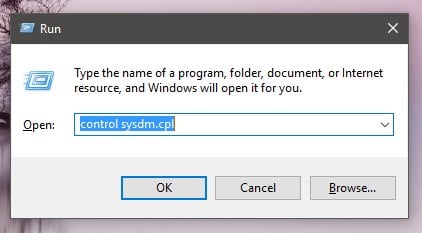
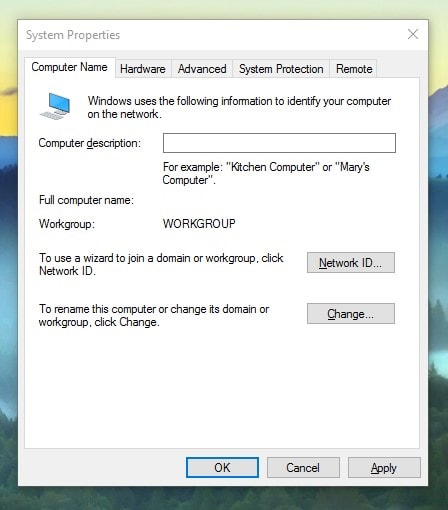
<p><strong>Bước 1:</strong>&nbsp;Nhấn tổ hợp phím&nbsp;<strong>Windows + R</strong>, gõ vào lệnh&nbsp;<strong>control sysdm.cpl</strong>&nbsp;và nhấn&nbsp;<strong>Enter</strong>, nếu Windows có hỏi xác nhận User Account Control thì bạn chọn Yes, hộp thoại System Properties sẽ hiện ra.</p>

<div style="text-align:center"><a href="https://thichchiase.com/wp-content/uploads/2016/12/cmd-system-properties.jpg"><img alt="cmd system properties" height="233" sizes="(max-width: 422px) 100vw, 422px" src="https://thcstranquangkhai.edu.vn/uploads/windows/2018_06/cmd-system-properties.jpg" srcset="https://thichchiase.com/wp-content/uploads/2016/12/cmd-system-properties.jpg 422w, https://thichchiase.com/wp-content/uploads/2016/12/cmd-system-properties-240x133.jpg 240w, https://thichchiase.com/wp-content/uploads/2016/12/cmd-system-properties-400x221.jpg 400w" width="422" /></a></div>

<p>Lệnh mở System Properties Cmd</p>

<div style="text-align:center"><a href="https://thichchiase.com/wp-content/uploads/2016/12/system-properties-min.jpg"><img alt="system properties min" height="510" sizes="(max-width: 448px) 100vw, 448px" src="https://thcstranquangkhai.edu.vn/uploads/windows/2018_06/system-properties-min.jpg" srcset="https://thichchiase.com/wp-content/uploads/2016/12/system-properties-min.jpg 448w, https://thichchiase.com/wp-content/uploads/2016/12/system-properties-min-240x273.jpg 240w, https://thichchiase.com/wp-content/uploads/2016/12/system-properties-min-400x455.jpg 400w" width="448" /></a></div>

<p>Hộp thoại System Properties</p>

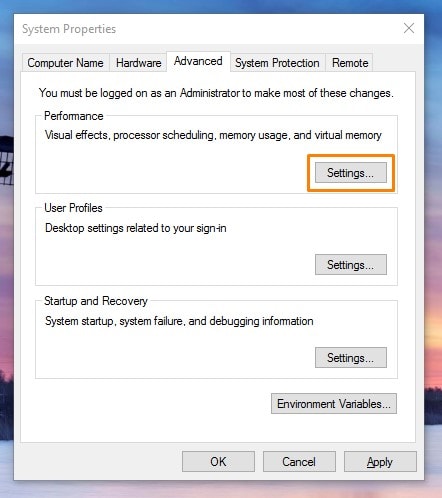
<p><strong>Bước 2:</strong>&nbsp;Tại hộp thoại&nbsp;System Properties, chuyển qua tab&nbsp;<strong>Advanced</strong>&nbsp;và chọn&nbsp;<strong>Settings</strong>&nbsp;ở mục&nbsp;<strong>Perfomance</strong></p>

<div style="text-align:center"><a href="https://thichchiase.com/wp-content/uploads/2016/12/advanced-min.jpg"><img alt="advanced min" height="498" sizes="(max-width: 442px) 100vw, 442px" src="https://thcstranquangkhai.edu.vn/uploads/windows/2018_06/advanced-min.jpg" srcset="https://thichchiase.com/wp-content/uploads/2016/12/advanced-min.jpg 442w, https://thichchiase.com/wp-content/uploads/2016/12/advanced-min-240x270.jpg 240w, https://thichchiase.com/wp-content/uploads/2016/12/advanced-min-400x451.jpg 400w" width="442" /></a></div>

<p>Chọn Settings ở mục Perfomance</p>

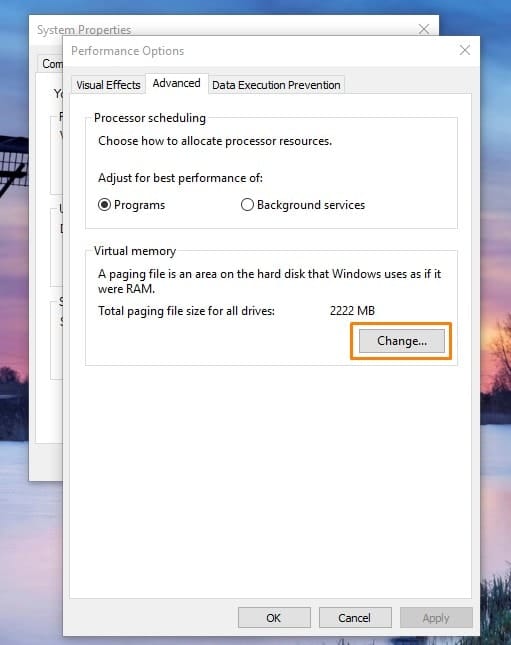
<p><strong>Bước 3:</strong>&nbsp;Tại hộp thoại Perfomance Options, chuyển qua tab&nbsp;<strong>Advanced</strong>&nbsp;và chọn&nbsp;<strong>Change</strong>&nbsp;ở mục&nbsp;<strong>Virtual Memory</strong></p>

<div style="text-align:center"><a href="https://thichchiase.com/wp-content/uploads/2016/12/performance-options-min.jpg"><img alt="performance options min" height="645" sizes="(max-width: 511px) 100vw, 511px" src="https://thcstranquangkhai.edu.vn/uploads/windows/2018_06/performance-options-min.jpg" srcset="https://thichchiase.com/wp-content/uploads/2016/12/performance-options-min.jpg 511w, https://thichchiase.com/wp-content/uploads/2016/12/performance-options-min-240x303.jpg 240w, https://thichchiase.com/wp-content/uploads/2016/12/performance-options-min-400x505.jpg 400w" width="511" /></a></div>

<p>Change Virtual Memory</p>

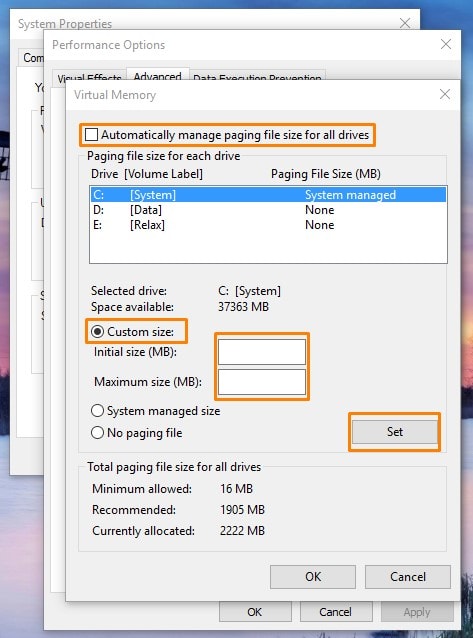
<p><strong>Bước 4:</strong>&nbsp;Tại hộp thoại Virtual Memory, bất đầu thiết lập RAM ảo</p>

<div style="text-align:center"><a href="https://thichchiase.com/wp-content/uploads/2016/12/virtual-memory-min.jpg"><img alt="virtual memory min" height="638" sizes="(max-width: 473px) 100vw, 473px" src="https://thcstranquangkhai.edu.vn/uploads/windows/2018_06/virtual-memory-min.jpg" srcset="https://thichchiase.com/wp-content/uploads/2016/12/virtual-memory-min.jpg 473w, https://thichchiase.com/wp-content/uploads/2016/12/virtual-memory-min-240x324.jpg 240w, https://thichchiase.com/wp-content/uploads/2016/12/virtual-memory-min-400x540.jpg 400w" width="473" /></a></div>

<p>Virtual Memory</p>

<ul>
	<li>Bỏ chọn Automatically manage paging file size for all drives</li>
	<li>Chọn Custom size</li>
	<li><strong>Initial size:</strong>&nbsp;dung lượng khởi đầu, dung lượng cho phép&nbsp;<strong>gấp 1.5 lần</strong>&nbsp;dung lượng RAM vật lý, ví dụ nếu RAM vật lý của bạn là&nbsp;<strong>2GB</strong>&nbsp;thì tính toán sẽ là&nbsp;<strong>2048 x 1.5 = 3072</strong>, lúc này bạn hãy điền vào ô là&nbsp;<strong>3072</strong></li>
	<li><strong>Maximum size:</strong>&nbsp;dung lượng tối đa, dung lượng này cho phép&nbsp;<strong>gấp 4 lần</strong>&nbsp;dung lượng RAM vật lý, RAM vật lý của bạn là 2GB thì tính toán sẽ là&nbsp;<strong>2048 x 4 = 8192</strong>, lúc này bạn hãy điền vào ô là&nbsp;<b>8192</b></li>
</ul>

<p>Sau đó nhấn&nbsp;<strong>Set</strong>&nbsp;và nhấn&nbsp;<strong>OK</strong>&nbsp;để lưu lại thiết lập, hệ thống sẽ yêu cầu khởi động lại, bạn hãy&nbsp;<strong>Restart</strong>&nbsp;máy tính để các thiết lập được thành công.</p>

<p>Tuy nhiên, cách thiết lập trên là đối với máy tính thiếu RAM trầm trọng, chẳng hạn những lúc chơi game đồ họa cao. Còn đối với máy tính không thiếu RAM nhưng hoạt động hơi chậm, bạn hãy để hệ thống tự động Setup hoặc đặt giá trị cho Initial và Maximum&nbsp;theo khuyến nghị của mục Total paging file size for all drivers.</p>

<p>Và không phải lúc nào bạn cũng nên đặt những con số tối đa so với tính toán, thay vào đó hãy đặt thấp hơn một tí, RAM bạn 2GB thì hãy tính theo mức 1GB, con số này sẽ an toàn cho hệ thống và ổ cứng nhiều hơn.</p>

<h2>Lời kết</h2>

<p>Hiển nhiên, bạn có thể thấy được cái lợi của việc dùng&nbsp;<strong>Virtual Memory</strong>, đó là bạn sẽ có ngay một lượng RAM ảo khá lớn để sử dụng mà không mất thêm chi phí cho việc mua RAM, bạn có thể sử dụng ngay chương trình cần thiết mà không phải bận tâm rằng máy hiện tại đang thiếu RAM.</p>

<p>Song, nếu bạn lạm dụng việc sử dụng&nbsp;<strong>RAM</strong>&nbsp;ảo thì máy sẽ chạy rất chậm, ổ cứng của máy bạn sẽ thường xuyên báo disk 100%, và nếu hoạt động hết công suất quá nhiều như vậy thì ổ cứng bạn sẽ rất dễ bị hỏng. Vì thế hãy xem xét trước những thời điểm hợp lý và thật sự cần thiết bạn hãy set RAM ảo nhé.</p>

<p>Chúc các bạn thành công!</p>
		</div>
	</div>
	<div id="footer" class="clearfix">
		<div id="url">
			<strong>URL của bản tin này: </strong><a href="https://thcstranquangkhai.edu.vn/index.php/vi/windows/Windows/ram-ao-la-gi-set-ram-ao-tren-windows-10-nhu-the-nao-la-hop-ly-298.html" title="RAM ảo là gì? Set RAM ảo trên Windows 10 như thế nào là hợp lý?">https://thcstranquangkhai.edu.vn/index.php/vi/windows/Windows/ram-ao-la-gi-set-ram-ao-tren-windows-10-nhu-the-nao-la-hop-ly-298.html</a>

		</div>
		<div class="clear"></div>
		<div class="copyright">
			&copy; Trường thcs Trần Quang Khải
		</div>
		<div id="contact">
			<a href="mailto:phavaphu@gmail.com">phavaphu@gmail.com</a>
		</div>
	</div>
</div>
        <div id="timeoutsess" class="chromeframe">
            Bạn đã không sử dụng Site, <a onclick="timeoutsesscancel();" href="https://thcstranquangkhai.edu.vn/#">Bấm vào đây để duy trì trạng thái đăng nhập</a>. Thời gian chờ: <span id="secField"> 60 </span> giây
        </div>
        <div id="openidResult" class="nv-alert" style="display:none"></div>
        <div id="openidBt" data-result="" data-redirect=""></div>
<div id="run_cronjobs" style="visibility:hidden;display:none;"><img alt="" src="/index.php?second=cronjobs&amp;p=i769lF6i" width="1" height="1" /></div>
<script src="https://thcstranquangkhai.edu.vn/assets/js/jquery/jquery.min.js"></script>
<script>var nv_base_siteurl="/",nv_lang_data="vi",nv_lang_interface="vi",nv_name_variable="nv",nv_fc_variable="op",nv_lang_variable="language",nv_module_name="windows",nv_func_name="savefile",nv_is_user=0, nv_my_ofs=7,nv_my_abbr="+07",nv_cookie_prefix="nv4c_y197C",nv_check_pass_mstime=1738000,nv_area_admin=0,nv_safemode=0,theme_responsive=0,nv_is_recaptcha=0;</script>
<script src="https://thcstranquangkhai.edu.vn/themes/defaultphavaphu/js/wow.js"></script>
<script src="https://thcstranquangkhai.edu.vn/themes/defaultphavaphu/js/wow.min.js"></script>
<script src="https://thcstranquangkhai.edu.vn/themes/defaultphavaphu/js/theia-sticky-sidebar.js"></script>
<script src="https://thcstranquangkhai.edu.vn/assets/js/language/vi.js"></script>
<script src="https://thcstranquangkhai.edu.vn/assets/js/global.js"></script>
<script src="https://thcstranquangkhai.edu.vn/themes/defaultphavaphu/js/news.js"></script>
<script src="https://thcstranquangkhai.edu.vn/assets/js/jquery/jquery.cookie.js"></script>
<script src="https://thcstranquangkhai.edu.vn/themes/defaultphavaphu/js/main.js"></script>
<script src="https://thcstranquangkhai.edu.vn/themes/defaultphavaphu/js/custom.js"></script>
<script type="text/javascript">
    (function(p,u,s,h){
        p._pcq=p._pcq||[];
        p._pcq.push(['_currentTime',Date.now()]);
        s=u.createElement('script');
        s.type='text/javascript';
        s.async=true;
        s.src='https://cdn.pushcrew.com/js/00454aebdd272f8e4c5a5b5e50ac4513.js';
        h=u.getElementsByTagName('script')[0];
        h.parentNode.insertBefore(s,h);
    })(window,document);
</script>
<script src="https://thcstranquangkhai.edu.vn/themes/defaultphavaphu/js/bootstrap.min.js"></script>
</body>
</html>