<!DOCTYPE html>
	<html lang="vi" xmlns="http://www.w3.org/1999/xhtml" prefix="og: http://ogp.me/ns#">
	<head>
<title>Cách tạo và sử dụng CSS TAB</title>
<meta name="description" content="Cách tạo và sử dụng CSS TAB - Savefile - Windows - https&#x3A;&#x002F;&#x002F;thcstranquangkhai.edu.vn&#x002F;index.php&#x002F;vi&#x002F;windows&#x002F;savefile&#x002F;nukeviet&#x002F;cach-tao-va-su-dung-css-tab-117.html">
<meta name="keywords" content="windows">
<meta name="news_keywords" content="windows">
<meta name="author" content="Trường thcs Trần Quang Khải">
<meta name="copyright" content="Trường thcs Trần Quang Khải &#91;phavaphu@gmail.com&#93;">
<meta name="robots" content="index, archive, follow, noodp">
<meta name="googlebot" content="index,archive,follow,noodp">
<meta name="msnbot" content="all,index,follow">
<meta name="google-site-verification" content="RcwYmWMVb8dh-0VdAvXEp4IOHtTN12pffjnuI5mDK1o">
<meta name="generator" content="NukeViet v4.0">
<meta http-equiv="Content-Type" content="text/html; charset=utf-8">
<meta property="article:author" content="http://thcstranquangkhai.edu.vn">
<meta property="og:title" content="Cách tạo và sử dụng CSS TAB">
<meta property="og:type" content="website">
<meta property="og:description" content="Savefile - Windows - https&#x3A;&#x002F;&#x002F;thcstranquangkhai.edu.vn&#x002F;index.php&#x002F;vi&#x002F;windows&#x002F;savefile&#x002F;nukeviet&#x002F;cach-tao-va-su-dung-css-tab-117.html">
<meta property="og:site_name" content="Trường thcs Trần Quang Khải">
<meta property="og:url" content="https://thcstranquangkhai.edu.vn/index.php/vi/windows/nukeviet/cach-tao-va-su-dung-css-tab-117.html">
<link rel="shortcut icon" href="https://thcstranquangkhai.edu.vn/uploads/favicon.ico">
<link rel="canonical" href="https://thcstranquangkhai.edu.vn/index.php/vi/windows/nukeviet/cach-tao-va-su-dung-css-tab-117.html">
<link rel="alternate" href="https://thcstranquangkhai.edu.vn/index.php/vi/windows/rss/" title="Windows" type="application/rss+xml">
<link rel="alternate" href="https://thcstranquangkhai.edu.vn/index.php/vi/windows/rss/thuat-thuat-bai-giang-van-phong/" title="Windows - Thuật thuật Bài giảng - Văn phòng" type="application/rss+xml">
<link rel="alternate" href="https://thcstranquangkhai.edu.vn/index.php/vi/windows/rss/bai-giang-e-learning/" title="Windows - Bài giảng E_Learning" type="application/rss+xml">
<link rel="alternate" href="https://thcstranquangkhai.edu.vn/index.php/vi/windows/rss/tai-lieu-su-dung-phan-mem-soan-giang-e-learning/" title="Windows - Tài liệu sử dụng phần mềm soạn giảng E_Learning" type="application/rss+xml">
<link rel="alternate" href="https://thcstranquangkhai.edu.vn/index.php/vi/windows/rss/Tin-cong-nghe/" title="Windows - Microsoft PowerPoint" type="application/rss+xml">
<link rel="alternate" href="https://thcstranquangkhai.edu.vn/index.php/vi/windows/rss/microsoft-word/" title="Windows - Microsoft Word" type="application/rss+xml">
<link rel="alternate" href="https://thcstranquangkhai.edu.vn/index.php/vi/windows/rss/microsoft-excel/" title="Windows - Microsoft Excel" type="application/rss+xml">
<link rel="alternate" href="https://thcstranquangkhai.edu.vn/index.php/vi/windows/rss/vnedu-phan-mem-nhap-diem/" title="Windows - VnEdu &#40;Phần mềm nhập điểm&#41;" type="application/rss+xml">
<link rel="alternate" href="https://thcstranquangkhai.edu.vn/index.php/vi/windows/rss/Thu-thuat-khac/" title="Windows - Thủ thuật khác" type="application/rss+xml">
<link rel="alternate" href="https://thcstranquangkhai.edu.vn/index.php/vi/windows/rss/thu-thuat-phan-mem-internet/" title="Windows - Thủ thuật Phần mềm - Internet" type="application/rss+xml">
<link rel="alternate" href="https://thcstranquangkhai.edu.vn/index.php/vi/windows/rss/proshow-proceducer/" title="Windows - Proshow Proceducer" type="application/rss+xml">
<link rel="alternate" href="https://thcstranquangkhai.edu.vn/index.php/vi/windows/rss/internet/" title="Windows - Internet" type="application/rss+xml">
<link rel="alternate" href="https://thcstranquangkhai.edu.vn/index.php/vi/windows/rss/nukeviet/" title="Windows - NukeViet" type="application/rss+xml">
<link rel="alternate" href="https://thcstranquangkhai.edu.vn/index.php/vi/windows/rss/thu-thuat-blogspot/" title="Windows - Thủ thuật Blogspot" type="application/rss+xml">
<link rel="alternate" href="https://thcstranquangkhai.edu.vn/index.php/vi/windows/rss/thu-thuat-usb/" title="Windows - Thủ thuật USB" type="application/rss+xml">
<link rel="alternate" href="https://thcstranquangkhai.edu.vn/index.php/vi/windows/rss/thu-thuat-youtube/" title="Windows - Thủ thuật Youtube" type="application/rss+xml">
<link rel="alternate" href="https://thcstranquangkhai.edu.vn/index.php/vi/windows/rss/Download-Upload/" title="Windows - Download - Upload" type="application/rss+xml">
<link rel="alternate" href="https://thcstranquangkhai.edu.vn/index.php/vi/windows/rss/may-chieu-projector/" title="Windows - Máy chiếu - Projector" type="application/rss+xml">
<link rel="alternate" href="https://thcstranquangkhai.edu.vn/index.php/vi/windows/rss/photoshop/" title="Windows - Photoshop" type="application/rss+xml">
<link rel="alternate" href="https://thcstranquangkhai.edu.vn/index.php/vi/windows/rss/driver/" title="Windows - Driver" type="application/rss+xml">
<link rel="alternate" href="https://thcstranquangkhai.edu.vn/index.php/vi/windows/rss/mang-xa-hoi/" title="Windows - Mạng xã hội" type="application/rss+xml">
<link rel="alternate" href="https://thcstranquangkhai.edu.vn/index.php/vi/windows/rss/Windows/" title="Windows - Windows" type="application/rss+xml">
<link rel="alternate" href="https://thcstranquangkhai.edu.vn/index.php/vi/windows/rss/phan-mem-soan-bai-giang-elearning/" title="Windows - Phần mềm soạn bài giảng Elearning" type="application/rss+xml">
<link rel="alternate" href="https://thcstranquangkhai.edu.vn/index.php/vi/windows/rss/San-pham/" title="Windows - Phần mềm SGK tin THCS" type="application/rss+xml">
<link rel="alternate" href="https://thcstranquangkhai.edu.vn/index.php/vi/windows/rss/phan-mem-tin-lop-6/" title="Windows - Phần mềm Tin lớp 6" type="application/rss+xml">
<link rel="alternate" href="https://thcstranquangkhai.edu.vn/index.php/vi/windows/rss/phan-mem-tin-lop-7/" title="Windows - Phần mềm Tin lớp 7" type="application/rss+xml">
<link rel="alternate" href="https://thcstranquangkhai.edu.vn/index.php/vi/windows/rss/phan-mem-tin-lop-8/" title="Windows - Phần mềm Tin lớp 8" type="application/rss+xml">
<link rel="alternate" href="https://thcstranquangkhai.edu.vn/index.php/vi/windows/rss/phan-mem-tin-lop-9/" title="Windows - Phần mềm Tin lớp 9" type="application/rss+xml">
<link rel="alternate" href="https://thcstranquangkhai.edu.vn/index.php/vi/windows/rss/phan-mem-tin-danh-cho-tieu-hoc/" title="Windows - Phần mềm tin dành cho Tiểu học" type="application/rss+xml">
<link rel="alternate" href="https://thcstranquangkhai.edu.vn/index.php/vi/windows/rss/phan-mem-tin-danh-cho-mam-non/" title="Windows - Phần mềm tin dành cho Mầm non" type="application/rss+xml">
<link rel="alternate" href="https://thcstranquangkhai.edu.vn/index.php/vi/windows/rss/giang-day-hoc-tap/" title="Windows - Giảng dạy - Học tập" type="application/rss+xml">
<link rel="alternate" href="https://thcstranquangkhai.edu.vn/index.php/vi/windows/rss/phan-mem-tap-huan/" title="Windows - Phần mềm tập huấn" type="application/rss+xml">
<link rel="alternate" href="https://thcstranquangkhai.edu.vn/index.php/vi/windows/rss/ung-dung-van-phong/" title="Windows - Ứng dụng Văn phòng" type="application/rss+xml">
<link rel="alternate" href="https://thcstranquangkhai.edu.vn/index.php/vi/windows/rss/phan-mem-phavaphu/" title="Windows - Phần mềm phavaphu" type="application/rss+xml">
<link rel="alternate" href="https://thcstranquangkhai.edu.vn/index.php/vi/windows/rss/he-dieu-hanh/" title="Windows - Hệ điều hành" type="application/rss+xml">
<link rel="alternate" href="https://thcstranquangkhai.edu.vn/index.php/vi/windows/rss/phan-mem-khac/" title="Windows - Phần mềm khác" type="application/rss+xml">
<link rel="alternate" href="https://thcstranquangkhai.edu.vn/index.php/vi/windows/rss/qt/" title="Windows - QT" type="application/rss+xml">
<link rel="alternate" href="https://thcstranquangkhai.edu.vn/index.php/vi/windows/rss/ban-ghost-win/" title="Windows - Bản Ghost Win" type="application/rss+xml">
<link rel="alternate" href="https://thcstranquangkhai.edu.vn/index.php/vi/windows/rss/lap-trinh-di-dong/" title="Windows - Lập trình di động" type="application/rss+xml">
<link rel="preload" as="script" href="https://thcstranquangkhai.edu.vn/assets/js/jquery/jquery.min.js">
<link rel="preload" as="script" href="https://thcstranquangkhai.edu.vn/themes/defaultphavaphu/js/wow.js">
<link rel="preload" as="script" href="https://thcstranquangkhai.edu.vn/themes/defaultphavaphu/js/wow.min.js">
<link rel="preload" as="script" href="https://thcstranquangkhai.edu.vn/themes/defaultphavaphu/js/theia-sticky-sidebar.js">
<link rel="preload" as="script" href="https://thcstranquangkhai.edu.vn/assets/js/language/vi.js">
<link rel="preload" as="script" href="https://thcstranquangkhai.edu.vn/assets/js/global.js">
<link rel="preload" as="script" href="https://thcstranquangkhai.edu.vn/themes/defaultphavaphu/js/news.js">
<link rel="preload" as="script" href="https://thcstranquangkhai.edu.vn/assets/js/jquery/jquery.cookie.js">
<link rel="preload" as="script" href="https://thcstranquangkhai.edu.vn/themes/defaultphavaphu/js/main.js">
<link rel="preload" as="script" href="https://thcstranquangkhai.edu.vn/themes/defaultphavaphu/js/custom.js">
<link rel="preload" as="script" href="https://thcstranquangkhai.edu.vn/themes/defaultphavaphu/js/bootstrap.min.js">
<link rel="StyleSheet" href="https://thcstranquangkhai.edu.vn/assets/css/font-awesome.min.css">
<link rel="StyleSheet" href="https://thcstranquangkhai.edu.vn/themes/defaultphavaphu/css/bootstrap.non-responsive.css">
<link rel="StyleSheet" href="https://thcstranquangkhai.edu.vn/themes/defaultphavaphu/css/style.css">
<link rel="StyleSheet" href="https://thcstranquangkhai.edu.vn/themes/defaultphavaphu/css/style.non-responsive.css">
<link rel="StyleSheet" href="https://thcstranquangkhai.edu.vn/themes/defaultphavaphu/css/news.css">
<link rel="StyleSheet" href="https://thcstranquangkhai.edu.vn/assets/css/defaultphavaphu.vi.0.css?t=77">
<link href="https://thcstranquangkhai.edu.vn/themes/defaultphavaphu/css/animate.css" rel="stylesheet">
<style>
	body{background: #fff;}
</style>
		<!-- BEGIN: thông báo đẩy js -->
		<!-- END: thông báo đẩy js -->
<script data-show="inline">(function(i,s,o,g,r,a,m){i['GoogleAnalyticsObject']=r;i[r]=i[r]||function(){
(i[r].q=i[r].q||[]).push(arguments)},i[r].l=1*new Date();a=s.createElement(o),
m=s.getElementsByTagName(o)[0];a.async=1;a.src=g;m.parentNode.insertBefore(a,m)
})(window,document,'script','https://www.google-analytics.com/analytics.js','ga');
ga('create', 'UA-81359612-1', '.thcstranquangkhai.edu.vn');
ga('send', 'pageview');
</script>
</head>
	<body>
<div id="print">
	<div id="hd_print">
		<h2 class="pull-left">Trường thcs Trần Quang Khải</h2>
		<p class="pull-right"><a title="Trường thcs Trần Quang Khải" href="https://thcstranquangkhai.edu.vn/">https://thcstranquangkhai.edu.vn</a></p>
	</div>
	<div class="clear"></div>
	<hr />
	<div id="content">
		<h1>Cách tạo và sử dụng CSS TAB</h1>
		<ul class="list-inline">
			<li>Thứ năm - 28/07/2016 09:34</li>
			<li class="hidden-print txtrequired"><em class="fa fa-print">&nbsp;</em><a title="In ra" href="javascript:;" onclick="window.print()">In ra</a></li>
			<li class="hidden-print txtrequired"><em class="fa fa-power-off">&nbsp;</em><a title="Đóng cửa sổ này" href="javascript:;" onclick="window.close()">Đóng cửa sổ này</a></li>
		</ul>
		<div class="clear"></div>
		<div id="hometext">
						<div class="pull-left imghome">
				<img alt="Cách tạo và sử dụng CSS TAB" src="https://thcstranquangkhai.edu.vn/assets/windows/2016_07/777.png" width="100" class="img-thumbnail" />
			</div>
			Như các bạn đã biết. Nukeviet tích hợp css bootstrap vào hệ thống theme mặc định của mình. Điều này giúp cho việc thiết kế giao diện tương thích trên các thiết bị trở nên đơn giản và nhanh chóng hơn. CSS TAB cũng đã được tích hợp sẵn trong Bootstrap CSS
		</div>
		<div id="bodytext" class="clearfix">
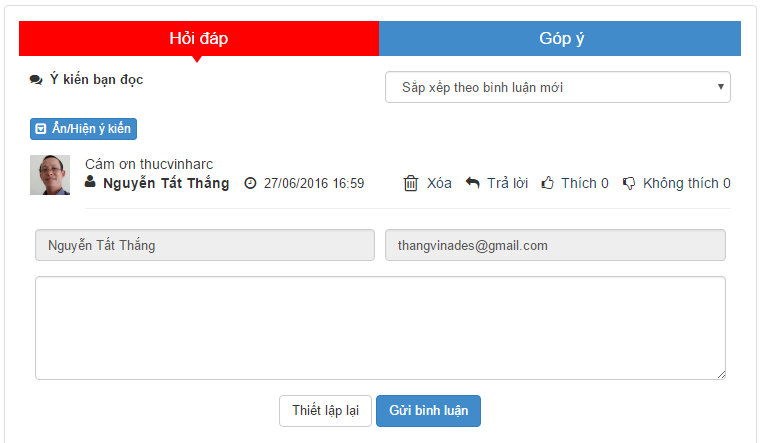
			<p>Tuy nhiên, đôi lúc mình muốn làm một hiểu hiệu ứng mượt mà, đẹp hơn. Bạn có thể tự tạo cho mình một kiểu tab đơn giản như sau:</p>

<div style="text-align:center"><img alt="" height="377" src="https://thcstranquangkhai.edu.vn/uploads/windows/2016_07/777.png" width="650" /></div>

<p>TÀI NGUYÊN</p>

<p>Bạn cần tạo 1 file css lưu vào thư mục themes-của-bạn/css &nbsp;trên mã nguồn web của bạn với nội dung như sau</p>

<pre>
<code class="language-css">.tabviewsection {
    border: 1px solid #33363B;
	border-radius: 5px;
    overflow: hidden;
}
.tabs_widget_left {
    list-style: none;
    list-style-type: none;
    margin: 0px;
    padding-left: 0px;
    height: 35px;
    background: #33363B;
    margin-left: -1px;
    margin-right: -1px;
	text-align:center
}

.tabs_widget_left li {
    list-style: none;
    list-style-type: none;
    padding: 0;
	display:inline-block;
	width:50%;
	margin-left:-1px;
	margin-right:-1px;
}

.tabs_widget_left li a.tabs_left_current {
    color: #fff;
    text-decoration: none;
    background: #79ACCD;
}
.tabs_widget_left li a {
    color: #fff;
    padding: 9px 13px;
    display: block;
    text-decoration: none;
    font-size: 17px;
    line-height: 17px;
	position:relative
}

.tabs_widget_left li a.tabs_left_current:after {
    color: #eb1c24;
    border-left: 5px solid transparent;
    border-right: 5px solid transparent;
    border-top: 5px solid #79ACCD;
    content: &quot;&quot;;
    position: absolute;
    z-index: 33333;
    left: 48%;
    top: 100%;
}

.tabs_left_conten{
	padding-top:15px
}</code></pre>

<p>&nbsp;</p>

<p>Nếu bạn biết một chút về CSS, bạn có thể dễ dàng tùy chỉnh các thông số màu sắc, font chữ, màu nền theo style của web mình cho ưng ý.</p>

<p>Tại nơi bạn muốn thể hiện CSS TAB trong html. Có thể là như khu vực bình luận mình đã làm trong trang chi tiết bài viết ( Xem demo tại<a href="http://hocmot.net/">http://hocmot.net</a>&nbsp;trong chi tiết bài viết)</p>

<p>Với demo trên thì mình đặt trong file detail.tpl của module news nukeviet. Còn bạn, có thể đặt mã này nơi nào muốn hiểu thị trên web bạn</p>

<p>&nbsp;</p>

<pre>
<code class="language-html">&lt;link type=&quot;text/css&quot; rel=&quot;stylesheet&quot; href=&quot;duong-dan-den-file-css&quot; /&gt;
&lt;ul class=&quot;tabs_widget_left tabs_left&quot;&gt;
	&lt;li class=&quot;tabs&quot;&gt;
		&lt;a href=&quot;#tabs-1&quot;&gt;Tieu de 1&lt;/a&gt;
	&lt;/li&gt;
	&lt;li class=&quot;tabs&quot;&gt;
		&lt;a href=&quot;#tabs-2&quot;&gt;Tieu de 2&lt;/a&gt;
	&lt;/li&gt;
&lt;/ul&gt;
&lt;div id=&quot;tabs-1&quot; class=&quot;tabs_left_conten&quot;&gt;
	NOI DUNG 1
&lt;/div&gt;

&lt;div id=&quot;tabs-2&quot; class=&quot;tabs_left_conten&quot;&gt;
	NOI DUNG 2
&lt;/div&gt;</code></pre>

<p>&nbsp;</p>

<p>Nếu bạn muốn thể hiện thêm nhiều tab:&nbsp;</p>

<p>_ trong thẻ ul bạn tạo thêm thẻ li có thuộc tính href=&quot;#tendat&quot; &nbsp;tabs-3 chẳng hạn</p>

<p>_ tạo thêm 1 thẻ div nội dung bên dưới có id=&quot;tendat&quot; &nbsp;tabs-3 chẳng hạn</p>

<p>&nbsp;</p>

<p>Đến này, CSS Tab vẫn chưa hoạt động. Vi nó chưa xác định được sự kiện khi bạn click chuột vào tiêu đề tab thì sẽ hiển thị nội dung nào?</p>

<p>Vậy, bạn cần thêm vào đoạn script sau ( có thể thêm ngay bên dưới mã html nơi thể hiện)</p>

<p>&nbsp;</p>

<pre>
<code>&lt;script type=&quot;text/javascript&quot;&gt;
        jQuery(document).ready(function($){
            $(&quot;.tabs_left_conten&quot;).hide();
            $(&quot;ul.tabs_left li:first a&quot;).addClass(&quot;tabs_left_current&quot;).show();
            $(&quot;.tabs_left_conten:first&quot;).show();
            $(&quot;ul.tabs_left a&quot;).click(function() {
            	$(&quot;ul.tabs_left a&quot;).removeClass(&quot;tabs_left_current a&quot;); 
            	$(this).addClass(&quot;tabs_left_current&quot;); 
            	$(&quot;.tabs_left_conten&quot;).hide(); 
            	    var activeTab = $(this).attr(&quot;href&quot;); 
            	$(activeTab).fadeIn();
            		return false;
            	});
        });
	&lt;/script&gt;</code></pre>

<p>&nbsp;</p>

<p>Ngoài dạng CSS Tab này, còn rất nhiều kiểu css khác. Cách thức hoạt động củng tương tự như vậy. Hy vọng bạn có thể xử lý được vấn đề này, và áp dụng được vào những kiểu CSS TAB khác.</p>
		</div>
				<div id="author">
						<p>
				<strong>Nguồn tin:</strong>
				nuke.vn
			</p>
		</div>
	</div>
	<div id="footer" class="clearfix">
		<div id="url">
			<strong>URL của bản tin này: </strong><a href="https://thcstranquangkhai.edu.vn/index.php/vi/windows/nukeviet/cach-tao-va-su-dung-css-tab-117.html" title="Cách tạo và sử dụng CSS TAB">https://thcstranquangkhai.edu.vn/index.php/vi/windows/nukeviet/cach-tao-va-su-dung-css-tab-117.html</a>

		</div>
		<div class="clear"></div>
		<div class="copyright">
			&copy; Trường thcs Trần Quang Khải
		</div>
		<div id="contact">
			<a href="mailto:phavaphu@gmail.com">phavaphu@gmail.com</a>
		</div>
	</div>
</div>
        <div id="timeoutsess" class="chromeframe">
            Bạn đã không sử dụng Site, <a onclick="timeoutsesscancel();" href="https://thcstranquangkhai.edu.vn/#">Bấm vào đây để duy trì trạng thái đăng nhập</a>. Thời gian chờ: <span id="secField"> 60 </span> giây
        </div>
        <div id="openidResult" class="nv-alert" style="display:none"></div>
        <div id="openidBt" data-result="" data-redirect=""></div>
<script src="https://thcstranquangkhai.edu.vn/assets/js/jquery/jquery.min.js"></script>
<script>var nv_base_siteurl="/",nv_lang_data="vi",nv_lang_interface="vi",nv_name_variable="nv",nv_fc_variable="op",nv_lang_variable="language",nv_module_name="windows",nv_func_name="savefile",nv_is_user=0, nv_my_ofs=7,nv_my_abbr="+07",nv_cookie_prefix="nv4c_y197C",nv_check_pass_mstime=1738000,nv_area_admin=0,nv_safemode=0,theme_responsive=0,nv_is_recaptcha=0;</script>
<script src="https://thcstranquangkhai.edu.vn/themes/defaultphavaphu/js/wow.js"></script>
<script src="https://thcstranquangkhai.edu.vn/themes/defaultphavaphu/js/wow.min.js"></script>
<script src="https://thcstranquangkhai.edu.vn/themes/defaultphavaphu/js/theia-sticky-sidebar.js"></script>
<script src="https://thcstranquangkhai.edu.vn/assets/js/language/vi.js"></script>
<script src="https://thcstranquangkhai.edu.vn/assets/js/global.js"></script>
<script src="https://thcstranquangkhai.edu.vn/themes/defaultphavaphu/js/news.js"></script>
<script src="https://thcstranquangkhai.edu.vn/assets/js/jquery/jquery.cookie.js"></script>
<script src="https://thcstranquangkhai.edu.vn/themes/defaultphavaphu/js/main.js"></script>
<script src="https://thcstranquangkhai.edu.vn/themes/defaultphavaphu/js/custom.js"></script>
<script type="text/javascript">
    (function(p,u,s,h){
        p._pcq=p._pcq||[];
        p._pcq.push(['_currentTime',Date.now()]);
        s=u.createElement('script');
        s.type='text/javascript';
        s.async=true;
        s.src='https://cdn.pushcrew.com/js/00454aebdd272f8e4c5a5b5e50ac4513.js';
        h=u.getElementsByTagName('script')[0];
        h.parentNode.insertBefore(s,h);
    })(window,document);
</script>
<script src="https://thcstranquangkhai.edu.vn/themes/defaultphavaphu/js/bootstrap.min.js"></script>
</body>
</html>