<!DOCTYPE html>
	<html lang="vi" xmlns="http://www.w3.org/1999/xhtml" prefix="og: http://ogp.me/ns#">
	<head>
<title>&#91;Module News&#93; Hướng dẫn thêm chức năng mở ảnh bài viết trong Shadowbox</title>
<meta name="description" content="&#91;Module News&#93; Hướng dẫn thêm chức năng mở ảnh bài viết trong Shadowbox - Savefile - Windows -...">
<meta name="keywords" content="windows">
<meta name="news_keywords" content="windows">
<meta name="author" content="Trường thcs Trần Quang Khải">
<meta name="copyright" content="Trường thcs Trần Quang Khải &#91;phavaphu@gmail.com&#93;">
<meta name="robots" content="index, archive, follow, noodp">
<meta name="googlebot" content="index,archive,follow,noodp">
<meta name="msnbot" content="all,index,follow">
<meta name="google-site-verification" content="RcwYmWMVb8dh-0VdAvXEp4IOHtTN12pffjnuI5mDK1o">
<meta name="generator" content="NukeViet v4.0">
<meta http-equiv="Content-Type" content="text/html; charset=utf-8">
<meta property="article:author" content="http://thcstranquangkhai.edu.vn">
<meta property="og:title" content="&#91;Module News&#93; Hướng dẫn thêm chức năng mở ảnh bài viết trong Shadowbox">
<meta property="og:type" content="website">
<meta property="og:description" content="Savefile - Windows - https&#x3A;&#x002F;&#x002F;thcstranquangkhai.edu.vn&#x002F;index.php&#x002F;vi&#x002F;windows&#x002F;savefile&#x002F;nukeviet&#x002F;module-news-huong-dan-them-chuc-nang-mo-anh-bai-viet-trong-shadowbox-131.html">
<meta property="og:site_name" content="Trường thcs Trần Quang Khải">
<meta property="og:url" content="https://thcstranquangkhai.edu.vn/index.php/vi/windows/nukeviet/module-news-huong-dan-them-chuc-nang-mo-anh-bai-viet-trong-shadowbox-131.html">
<link rel="shortcut icon" href="https://thcstranquangkhai.edu.vn/uploads/favicon.ico">
<link rel="canonical" href="https://thcstranquangkhai.edu.vn/index.php/vi/windows/nukeviet/module-news-huong-dan-them-chuc-nang-mo-anh-bai-viet-trong-shadowbox-131.html">
<link rel="alternate" href="https://thcstranquangkhai.edu.vn/index.php/vi/windows/rss/" title="Windows" type="application/rss+xml">
<link rel="alternate" href="https://thcstranquangkhai.edu.vn/index.php/vi/windows/rss/thuat-thuat-bai-giang-van-phong/" title="Windows - Thuật thuật Bài giảng - Văn phòng" type="application/rss+xml">
<link rel="alternate" href="https://thcstranquangkhai.edu.vn/index.php/vi/windows/rss/bai-giang-e-learning/" title="Windows - Bài giảng E_Learning" type="application/rss+xml">
<link rel="alternate" href="https://thcstranquangkhai.edu.vn/index.php/vi/windows/rss/tai-lieu-su-dung-phan-mem-soan-giang-e-learning/" title="Windows - Tài liệu sử dụng phần mềm soạn giảng E_Learning" type="application/rss+xml">
<link rel="alternate" href="https://thcstranquangkhai.edu.vn/index.php/vi/windows/rss/Tin-cong-nghe/" title="Windows - Microsoft PowerPoint" type="application/rss+xml">
<link rel="alternate" href="https://thcstranquangkhai.edu.vn/index.php/vi/windows/rss/microsoft-word/" title="Windows - Microsoft Word" type="application/rss+xml">
<link rel="alternate" href="https://thcstranquangkhai.edu.vn/index.php/vi/windows/rss/microsoft-excel/" title="Windows - Microsoft Excel" type="application/rss+xml">
<link rel="alternate" href="https://thcstranquangkhai.edu.vn/index.php/vi/windows/rss/vnedu-phan-mem-nhap-diem/" title="Windows - VnEdu &#40;Phần mềm nhập điểm&#41;" type="application/rss+xml">
<link rel="alternate" href="https://thcstranquangkhai.edu.vn/index.php/vi/windows/rss/Thu-thuat-khac/" title="Windows - Thủ thuật khác" type="application/rss+xml">
<link rel="alternate" href="https://thcstranquangkhai.edu.vn/index.php/vi/windows/rss/thu-thuat-phan-mem-internet/" title="Windows - Thủ thuật Phần mềm - Internet" type="application/rss+xml">
<link rel="alternate" href="https://thcstranquangkhai.edu.vn/index.php/vi/windows/rss/proshow-proceducer/" title="Windows - Proshow Proceducer" type="application/rss+xml">
<link rel="alternate" href="https://thcstranquangkhai.edu.vn/index.php/vi/windows/rss/internet/" title="Windows - Internet" type="application/rss+xml">
<link rel="alternate" href="https://thcstranquangkhai.edu.vn/index.php/vi/windows/rss/nukeviet/" title="Windows - NukeViet" type="application/rss+xml">
<link rel="alternate" href="https://thcstranquangkhai.edu.vn/index.php/vi/windows/rss/thu-thuat-blogspot/" title="Windows - Thủ thuật Blogspot" type="application/rss+xml">
<link rel="alternate" href="https://thcstranquangkhai.edu.vn/index.php/vi/windows/rss/thu-thuat-usb/" title="Windows - Thủ thuật USB" type="application/rss+xml">
<link rel="alternate" href="https://thcstranquangkhai.edu.vn/index.php/vi/windows/rss/thu-thuat-youtube/" title="Windows - Thủ thuật Youtube" type="application/rss+xml">
<link rel="alternate" href="https://thcstranquangkhai.edu.vn/index.php/vi/windows/rss/Download-Upload/" title="Windows - Download - Upload" type="application/rss+xml">
<link rel="alternate" href="https://thcstranquangkhai.edu.vn/index.php/vi/windows/rss/may-chieu-projector/" title="Windows - Máy chiếu - Projector" type="application/rss+xml">
<link rel="alternate" href="https://thcstranquangkhai.edu.vn/index.php/vi/windows/rss/photoshop/" title="Windows - Photoshop" type="application/rss+xml">
<link rel="alternate" href="https://thcstranquangkhai.edu.vn/index.php/vi/windows/rss/driver/" title="Windows - Driver" type="application/rss+xml">
<link rel="alternate" href="https://thcstranquangkhai.edu.vn/index.php/vi/windows/rss/mang-xa-hoi/" title="Windows - Mạng xã hội" type="application/rss+xml">
<link rel="alternate" href="https://thcstranquangkhai.edu.vn/index.php/vi/windows/rss/Windows/" title="Windows - Windows" type="application/rss+xml">
<link rel="alternate" href="https://thcstranquangkhai.edu.vn/index.php/vi/windows/rss/phan-mem-soan-bai-giang-elearning/" title="Windows - Phần mềm soạn bài giảng Elearning" type="application/rss+xml">
<link rel="alternate" href="https://thcstranquangkhai.edu.vn/index.php/vi/windows/rss/San-pham/" title="Windows - Phần mềm SGK tin THCS" type="application/rss+xml">
<link rel="alternate" href="https://thcstranquangkhai.edu.vn/index.php/vi/windows/rss/phan-mem-tin-lop-6/" title="Windows - Phần mềm Tin lớp 6" type="application/rss+xml">
<link rel="alternate" href="https://thcstranquangkhai.edu.vn/index.php/vi/windows/rss/phan-mem-tin-lop-7/" title="Windows - Phần mềm Tin lớp 7" type="application/rss+xml">
<link rel="alternate" href="https://thcstranquangkhai.edu.vn/index.php/vi/windows/rss/phan-mem-tin-lop-8/" title="Windows - Phần mềm Tin lớp 8" type="application/rss+xml">
<link rel="alternate" href="https://thcstranquangkhai.edu.vn/index.php/vi/windows/rss/phan-mem-tin-lop-9/" title="Windows - Phần mềm Tin lớp 9" type="application/rss+xml">
<link rel="alternate" href="https://thcstranquangkhai.edu.vn/index.php/vi/windows/rss/phan-mem-tin-danh-cho-tieu-hoc/" title="Windows - Phần mềm tin dành cho Tiểu học" type="application/rss+xml">
<link rel="alternate" href="https://thcstranquangkhai.edu.vn/index.php/vi/windows/rss/phan-mem-tin-danh-cho-mam-non/" title="Windows - Phần mềm tin dành cho Mầm non" type="application/rss+xml">
<link rel="alternate" href="https://thcstranquangkhai.edu.vn/index.php/vi/windows/rss/giang-day-hoc-tap/" title="Windows - Giảng dạy - Học tập" type="application/rss+xml">
<link rel="alternate" href="https://thcstranquangkhai.edu.vn/index.php/vi/windows/rss/phan-mem-tap-huan/" title="Windows - Phần mềm tập huấn" type="application/rss+xml">
<link rel="alternate" href="https://thcstranquangkhai.edu.vn/index.php/vi/windows/rss/ung-dung-van-phong/" title="Windows - Ứng dụng Văn phòng" type="application/rss+xml">
<link rel="alternate" href="https://thcstranquangkhai.edu.vn/index.php/vi/windows/rss/phan-mem-phavaphu/" title="Windows - Phần mềm phavaphu" type="application/rss+xml">
<link rel="alternate" href="https://thcstranquangkhai.edu.vn/index.php/vi/windows/rss/he-dieu-hanh/" title="Windows - Hệ điều hành" type="application/rss+xml">
<link rel="alternate" href="https://thcstranquangkhai.edu.vn/index.php/vi/windows/rss/phan-mem-khac/" title="Windows - Phần mềm khác" type="application/rss+xml">
<link rel="alternate" href="https://thcstranquangkhai.edu.vn/index.php/vi/windows/rss/qt/" title="Windows - QT" type="application/rss+xml">
<link rel="alternate" href="https://thcstranquangkhai.edu.vn/index.php/vi/windows/rss/ban-ghost-win/" title="Windows - Bản Ghost Win" type="application/rss+xml">
<link rel="alternate" href="https://thcstranquangkhai.edu.vn/index.php/vi/windows/rss/lap-trinh-di-dong/" title="Windows - Lập trình di động" type="application/rss+xml">
<link rel="preload" as="script" href="https://thcstranquangkhai.edu.vn/assets/js/jquery/jquery.min.js">
<link rel="preload" as="script" href="https://thcstranquangkhai.edu.vn/themes/defaultphavaphu/js/wow.js">
<link rel="preload" as="script" href="https://thcstranquangkhai.edu.vn/themes/defaultphavaphu/js/wow.min.js">
<link rel="preload" as="script" href="https://thcstranquangkhai.edu.vn/themes/defaultphavaphu/js/theia-sticky-sidebar.js">
<link rel="preload" as="script" href="https://thcstranquangkhai.edu.vn/assets/js/language/vi.js">
<link rel="preload" as="script" href="https://thcstranquangkhai.edu.vn/assets/js/global.js">
<link rel="preload" as="script" href="https://thcstranquangkhai.edu.vn/themes/defaultphavaphu/js/news.js">
<link rel="preload" as="script" href="https://thcstranquangkhai.edu.vn/assets/js/jquery/jquery.cookie.js">
<link rel="preload" as="script" href="https://thcstranquangkhai.edu.vn/themes/defaultphavaphu/js/main.js">
<link rel="preload" as="script" href="https://thcstranquangkhai.edu.vn/themes/defaultphavaphu/js/custom.js">
<link rel="preload" as="script" href="https://thcstranquangkhai.edu.vn/themes/defaultphavaphu/js/bootstrap.min.js">
<link rel="StyleSheet" href="https://thcstranquangkhai.edu.vn/assets/css/font-awesome.min.css">
<link rel="StyleSheet" href="https://thcstranquangkhai.edu.vn/themes/defaultphavaphu/css/bootstrap.non-responsive.css">
<link rel="StyleSheet" href="https://thcstranquangkhai.edu.vn/themes/defaultphavaphu/css/style.css">
<link rel="StyleSheet" href="https://thcstranquangkhai.edu.vn/themes/defaultphavaphu/css/style.non-responsive.css">
<link rel="StyleSheet" href="https://thcstranquangkhai.edu.vn/themes/defaultphavaphu/css/news.css">
<link rel="StyleSheet" href="https://thcstranquangkhai.edu.vn/assets/css/defaultphavaphu.vi.0.css?t=77">
<link href="https://thcstranquangkhai.edu.vn/themes/defaultphavaphu/css/animate.css" rel="stylesheet">
<style>
	body{background: #fff;}
</style>
		<!-- BEGIN: thông báo đẩy js -->
		<!-- END: thông báo đẩy js -->
<script data-show="inline">(function(i,s,o,g,r,a,m){i['GoogleAnalyticsObject']=r;i[r]=i[r]||function(){
(i[r].q=i[r].q||[]).push(arguments)},i[r].l=1*new Date();a=s.createElement(o),
m=s.getElementsByTagName(o)[0];a.async=1;a.src=g;m.parentNode.insertBefore(a,m)
})(window,document,'script','https://www.google-analytics.com/analytics.js','ga');
ga('create', 'UA-81359612-1', '.thcstranquangkhai.edu.vn');
ga('send', 'pageview');
</script>
</head>
	<body>
<div id="print">
	<div id="hd_print">
		<h2 class="pull-left">Trường thcs Trần Quang Khải</h2>
		<p class="pull-right"><a title="Trường thcs Trần Quang Khải" href="https://thcstranquangkhai.edu.vn/">https://thcstranquangkhai.edu.vn</a></p>
	</div>
	<div class="clear"></div>
	<hr />
	<div id="content">
		<h1>&#91;Module News&#93; Hướng dẫn thêm chức năng mở ảnh bài viết trong Shadowbox</h1>
		<ul class="list-inline">
			<li>Chủ nhật - 21/08/2016 13:28</li>
			<li class="hidden-print txtrequired"><em class="fa fa-print">&nbsp;</em><a title="In ra" href="javascript:;" onclick="window.print()">In ra</a></li>
			<li class="hidden-print txtrequired"><em class="fa fa-power-off">&nbsp;</em><a title="Đóng cửa sổ này" href="javascript:;" onclick="window.close()">Đóng cửa sổ này</a></li>
		</ul>
		<div class="clear"></div>
		<div id="hometext">
						<div class="pull-left imghome">
				<img alt="&#91;Module News&#93; Hướng dẫn thêm chức năng mở ảnh bài viết trong Shadowbox" src="https://thcstranquangkhai.edu.vn/assets/windows/2016_08/selection_271_800_393.png" width="100" class="img-thumbnail" />
			</div>
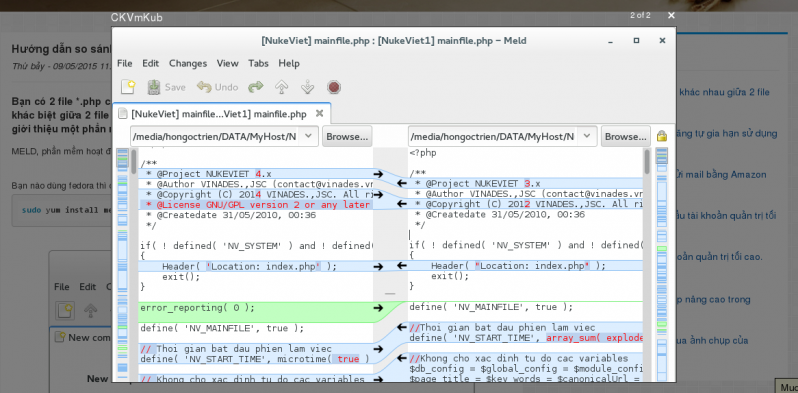
			Đoạn code dưới đây giúp bạn thêm chức năng xem tất cả ảnh trong bài viết ở dạng popup (Shadowbox).
		</div>
		<div id="bodytext" class="clearfix">
			<figure>
<div style="text-align:center"><img alt="selection 271 800 393" height="393" src="https://thcstranquangkhai.edu.vn/uploads/windows/2016_08/selection_271_800_393.png" width="798" /></div>
</figure>
&nbsp;

<h2><strong><a id="Thực hiện trên NukeViet 4" name="Thực hiện trên NukeViet 4">Thực hiện trên NukeViet 4</a></strong></h2>
<strong>Bước 1:</strong>&nbsp;NukeViet 4 đã bỏ thư viện shadowbox ra khỏi hệ thống, nên bạn cần download lại thư viện này.<br  />
<strong>Download shadowbox:</strong>&nbsp;&nbsp;<a href="https://github.com/mjackson/shadowbox">https://github.com/mjackson/shadowbox</a><br  />
Giải nén tập tin vừa download, đổi tên thư mục&nbsp;<strong>source</strong>&nbsp;thành&nbsp;<strong>shadowbox</strong>&nbsp;sau đó copy thư mục này vào&nbsp;<strong>assets/js/.&nbsp;</strong>Khi đó, sẽ tồn tại đường dẫn<strong>&nbsp;assets/js/shadowbox</strong><br  />
<br  />
<strong>Bước 2:&nbsp;</strong><br  />
Mở file&nbsp;<strong>themes/default/modules/news/detail.tpl&nbsp;</strong>(Các theme khác làm tương tự)<br  />
Tìm
<pre>
<code>&lt;!-- END: main --&gt;</code></pre>
Thêm lên trên:

<pre>
<code>&lt;link href=&quot;/assets/js/shadowbox/shadowbox.css&quot; type=&quot;text/css&quot; rel=&quot;stylesheet&quot;/&gt;
&lt;script src=&quot;/assets/js/shadowbox/shadowbox.js&quot; type=&quot;text/javascript&quot;&gt;&lt;/script&gt;
&lt;script&gt;
	$(&quot;.bodytext img&quot;).wrap(function() {
		var $_this = $(this).parent();
		$_this.html(&#039;&lt;a href=&quot;&#039; + $(this).attr(&quot;src&quot;) + &#039;&quot; rel=&quot;shadowbox&#91;{NEWSID}&#93;&quot; title=&quot;&#039; + $(this).attr(&quot;alt&quot;) + &#039;&quot;&gt;&#039; + $_this.html() + &#039;&lt;/a&gt;&#039;);
	}); 
&lt;/script&gt;</code></pre>

<h2><strong><a id="Thực hiện trên NukeViet 3" name="Thực hiện trên NukeViet 3">Thực hiện trên NukeViet 3</a></strong></h2>
NukeViet 3 đã có thư viện shadowbox, nên không cần tải thêm như ở&nbsp;<a href="http://mynukeviet.net/tag/nukeviet-4">NukeViet 4</a>.&nbsp;<br  />
Mở file&nbsp;<strong>themes/default/modules/news/detail.tpl&nbsp;</strong>(Các theme khác làm tương tự)<br  />
Tìm
<pre>
<code>&lt;!-- END: main --&gt;</code></pre>
Thêm lên trên

<pre>
<code>&lt;script type=&quot;text/javascript&quot;&gt;
	$(&#039;#news_detail img&#039;).wrap(function() {
		var $_this = $(this).parent();
		$_this.html(&#039;&lt;a href=&quot;&#039; + $(this).attr(&quot;src&quot;) + &#039;&quot; rel=&quot;shadowbox&#91;{NEWSID}&#93;&quot; title=&quot;&#039; + $(this).attr(&quot;alt&quot;) + &#039;&quot;&gt;&#039; + $_this.html() + &#039;&lt;/a&gt;&#039;);
	}); 
&lt;/script&gt;</code></pre>
<br  />
Khi click vào ảnh trong bài viết, ảnh trong bài viết sẽ hiển thị trong hộp&nbsp;<strong>Shadowbox</strong>. Nếu bài viết có nhiều ảnh, thì sẽ có nút bấm để chuyển qua ảnh tiếp theo.<br  />
<br  />
Trang xem chi tiết bài viết của news mặc định đã load sẵn thư viện&nbsp;<strong>Shadowbox</strong>, nên ở bài viết này không đề cập đến việc chèn thư viện. Nếu giao diện các bạn chưa load thư viện&nbsp;<strong>Shadowbox</strong>&nbsp;thì cần bổ sung.<br  />
<br  />
Với hướng dẫn này các bạn có thể làm tương tự cho các thư viện khác, như colorbox, lightbox,....
		</div>
				<div id="author">
						<p>
				<strong>Nguồn tin:</strong>
				mynukeviet.net
			</p>
		</div>
	</div>
	<div id="footer" class="clearfix">
		<div id="url">
			<strong>URL của bản tin này: </strong><a href="https://thcstranquangkhai.edu.vn/index.php/vi/windows/nukeviet/module-news-huong-dan-them-chuc-nang-mo-anh-bai-viet-trong-shadowbox-131.html" title="&#91;Module News&#93; Hướng dẫn thêm chức năng mở ảnh bài viết trong Shadowbox">https://thcstranquangkhai.edu.vn/index.php/vi/windows/nukeviet/module-news-huong-dan-them-chuc-nang-mo-anh-bai-viet-trong-shadowbox-131.html</a>

		</div>
		<div class="clear"></div>
		<div class="copyright">
			&copy; Trường thcs Trần Quang Khải
		</div>
		<div id="contact">
			<a href="mailto:phavaphu@gmail.com">phavaphu@gmail.com</a>
		</div>
	</div>
</div>
        <div id="timeoutsess" class="chromeframe">
            Bạn đã không sử dụng Site, <a onclick="timeoutsesscancel();" href="https://thcstranquangkhai.edu.vn/#">Bấm vào đây để duy trì trạng thái đăng nhập</a>. Thời gian chờ: <span id="secField"> 60 </span> giây
        </div>
        <div id="openidResult" class="nv-alert" style="display:none"></div>
        <div id="openidBt" data-result="" data-redirect=""></div>
<script src="https://thcstranquangkhai.edu.vn/assets/js/jquery/jquery.min.js"></script>
<script>var nv_base_siteurl="/",nv_lang_data="vi",nv_lang_interface="vi",nv_name_variable="nv",nv_fc_variable="op",nv_lang_variable="language",nv_module_name="windows",nv_func_name="savefile",nv_is_user=0, nv_my_ofs=7,nv_my_abbr="+07",nv_cookie_prefix="nv4c_y197C",nv_check_pass_mstime=1738000,nv_area_admin=0,nv_safemode=0,theme_responsive=0,nv_is_recaptcha=0;</script>
<script src="https://thcstranquangkhai.edu.vn/themes/defaultphavaphu/js/wow.js"></script>
<script src="https://thcstranquangkhai.edu.vn/themes/defaultphavaphu/js/wow.min.js"></script>
<script src="https://thcstranquangkhai.edu.vn/themes/defaultphavaphu/js/theia-sticky-sidebar.js"></script>
<script src="https://thcstranquangkhai.edu.vn/assets/js/language/vi.js"></script>
<script src="https://thcstranquangkhai.edu.vn/assets/js/global.js"></script>
<script src="https://thcstranquangkhai.edu.vn/themes/defaultphavaphu/js/news.js"></script>
<script src="https://thcstranquangkhai.edu.vn/assets/js/jquery/jquery.cookie.js"></script>
<script src="https://thcstranquangkhai.edu.vn/themes/defaultphavaphu/js/main.js"></script>
<script src="https://thcstranquangkhai.edu.vn/themes/defaultphavaphu/js/custom.js"></script>
<script type="text/javascript">
    (function(p,u,s,h){
        p._pcq=p._pcq||[];
        p._pcq.push(['_currentTime',Date.now()]);
        s=u.createElement('script');
        s.type='text/javascript';
        s.async=true;
        s.src='https://cdn.pushcrew.com/js/00454aebdd272f8e4c5a5b5e50ac4513.js';
        h=u.getElementsByTagName('script')[0];
        h.parentNode.insertBefore(s,h);
    })(window,document);
</script>
<script src="https://thcstranquangkhai.edu.vn/themes/defaultphavaphu/js/bootstrap.min.js"></script>
</body>
</html>