<!DOCTYPE html>
	<html lang="vi" xmlns="http://www.w3.org/1999/xhtml" prefix="og: http://ogp.me/ns#">
	<head>
<title>Plesk - Phân Quyền &#40;CHMOD&#41; File&#x002F;Thư Mục</title>
<meta name="description" content="Plesk - Phân Quyền &#40;CHMOD&#41; File&#x002F;Thư Mục - Savefile - Windows -...">
<meta name="keywords" content="windows">
<meta name="news_keywords" content="windows">
<meta name="author" content="Trường thcs Trần Quang Khải">
<meta name="copyright" content="Trường thcs Trần Quang Khải &#91;phavaphu@gmail.com&#93;">
<meta name="robots" content="index, archive, follow, noodp">
<meta name="googlebot" content="index,archive,follow,noodp">
<meta name="msnbot" content="all,index,follow">
<meta name="google-site-verification" content="RcwYmWMVb8dh-0VdAvXEp4IOHtTN12pffjnuI5mDK1o">
<meta name="generator" content="NukeViet v4.0">
<meta http-equiv="Content-Type" content="text/html; charset=utf-8">
<meta property="article:author" content="http://thcstranquangkhai.edu.vn">
<meta property="og:title" content="Plesk - Phân Quyền &#40;CHMOD&#41; File&#x002F;Thư Mục">
<meta property="og:type" content="website">
<meta property="og:description" content="Savefile - Windows - https&#x3A;&#x002F;&#x002F;thcstranquangkhai.edu.vn&#x002F;index.php&#x002F;vi&#x002F;windows&#x002F;savefile&#x002F;nukeviet&#x002F;plesk-phan-quyen-chmod-file-thu-muc-339.html">
<meta property="og:site_name" content="Trường thcs Trần Quang Khải">
<meta property="og:url" content="https://thcstranquangkhai.edu.vn/index.php/vi/windows/nukeviet/plesk-phan-quyen-chmod-file-thu-muc-339.html">
<link rel="shortcut icon" href="https://thcstranquangkhai.edu.vn/uploads/favicon.ico">
<link rel="canonical" href="https://thcstranquangkhai.edu.vn/index.php/vi/windows/nukeviet/plesk-phan-quyen-chmod-file-thu-muc-339.html">
<link rel="alternate" href="https://thcstranquangkhai.edu.vn/index.php/vi/windows/rss/" title="Windows" type="application/rss+xml">
<link rel="alternate" href="https://thcstranquangkhai.edu.vn/index.php/vi/windows/rss/thuat-thuat-bai-giang-van-phong/" title="Windows - Thuật thuật Bài giảng - Văn phòng" type="application/rss+xml">
<link rel="alternate" href="https://thcstranquangkhai.edu.vn/index.php/vi/windows/rss/bai-giang-e-learning/" title="Windows - Bài giảng E_Learning" type="application/rss+xml">
<link rel="alternate" href="https://thcstranquangkhai.edu.vn/index.php/vi/windows/rss/tai-lieu-su-dung-phan-mem-soan-giang-e-learning/" title="Windows - Tài liệu sử dụng phần mềm soạn giảng E_Learning" type="application/rss+xml">
<link rel="alternate" href="https://thcstranquangkhai.edu.vn/index.php/vi/windows/rss/Tin-cong-nghe/" title="Windows - Microsoft PowerPoint" type="application/rss+xml">
<link rel="alternate" href="https://thcstranquangkhai.edu.vn/index.php/vi/windows/rss/microsoft-word/" title="Windows - Microsoft Word" type="application/rss+xml">
<link rel="alternate" href="https://thcstranquangkhai.edu.vn/index.php/vi/windows/rss/microsoft-excel/" title="Windows - Microsoft Excel" type="application/rss+xml">
<link rel="alternate" href="https://thcstranquangkhai.edu.vn/index.php/vi/windows/rss/vnedu-phan-mem-nhap-diem/" title="Windows - VnEdu &#40;Phần mềm nhập điểm&#41;" type="application/rss+xml">
<link rel="alternate" href="https://thcstranquangkhai.edu.vn/index.php/vi/windows/rss/Thu-thuat-khac/" title="Windows - Thủ thuật khác" type="application/rss+xml">
<link rel="alternate" href="https://thcstranquangkhai.edu.vn/index.php/vi/windows/rss/thu-thuat-phan-mem-internet/" title="Windows - Thủ thuật Phần mềm - Internet" type="application/rss+xml">
<link rel="alternate" href="https://thcstranquangkhai.edu.vn/index.php/vi/windows/rss/proshow-proceducer/" title="Windows - Proshow Proceducer" type="application/rss+xml">
<link rel="alternate" href="https://thcstranquangkhai.edu.vn/index.php/vi/windows/rss/internet/" title="Windows - Internet" type="application/rss+xml">
<link rel="alternate" href="https://thcstranquangkhai.edu.vn/index.php/vi/windows/rss/nukeviet/" title="Windows - NukeViet" type="application/rss+xml">
<link rel="alternate" href="https://thcstranquangkhai.edu.vn/index.php/vi/windows/rss/thu-thuat-blogspot/" title="Windows - Thủ thuật Blogspot" type="application/rss+xml">
<link rel="alternate" href="https://thcstranquangkhai.edu.vn/index.php/vi/windows/rss/thu-thuat-usb/" title="Windows - Thủ thuật USB" type="application/rss+xml">
<link rel="alternate" href="https://thcstranquangkhai.edu.vn/index.php/vi/windows/rss/thu-thuat-youtube/" title="Windows - Thủ thuật Youtube" type="application/rss+xml">
<link rel="alternate" href="https://thcstranquangkhai.edu.vn/index.php/vi/windows/rss/Download-Upload/" title="Windows - Download - Upload" type="application/rss+xml">
<link rel="alternate" href="https://thcstranquangkhai.edu.vn/index.php/vi/windows/rss/may-chieu-projector/" title="Windows - Máy chiếu - Projector" type="application/rss+xml">
<link rel="alternate" href="https://thcstranquangkhai.edu.vn/index.php/vi/windows/rss/photoshop/" title="Windows - Photoshop" type="application/rss+xml">
<link rel="alternate" href="https://thcstranquangkhai.edu.vn/index.php/vi/windows/rss/driver/" title="Windows - Driver" type="application/rss+xml">
<link rel="alternate" href="https://thcstranquangkhai.edu.vn/index.php/vi/windows/rss/mang-xa-hoi/" title="Windows - Mạng xã hội" type="application/rss+xml">
<link rel="alternate" href="https://thcstranquangkhai.edu.vn/index.php/vi/windows/rss/Windows/" title="Windows - Windows" type="application/rss+xml">
<link rel="alternate" href="https://thcstranquangkhai.edu.vn/index.php/vi/windows/rss/phan-mem-soan-bai-giang-elearning/" title="Windows - Phần mềm soạn bài giảng Elearning" type="application/rss+xml">
<link rel="alternate" href="https://thcstranquangkhai.edu.vn/index.php/vi/windows/rss/San-pham/" title="Windows - Phần mềm SGK tin THCS" type="application/rss+xml">
<link rel="alternate" href="https://thcstranquangkhai.edu.vn/index.php/vi/windows/rss/phan-mem-tin-lop-6/" title="Windows - Phần mềm Tin lớp 6" type="application/rss+xml">
<link rel="alternate" href="https://thcstranquangkhai.edu.vn/index.php/vi/windows/rss/phan-mem-tin-lop-7/" title="Windows - Phần mềm Tin lớp 7" type="application/rss+xml">
<link rel="alternate" href="https://thcstranquangkhai.edu.vn/index.php/vi/windows/rss/phan-mem-tin-lop-8/" title="Windows - Phần mềm Tin lớp 8" type="application/rss+xml">
<link rel="alternate" href="https://thcstranquangkhai.edu.vn/index.php/vi/windows/rss/phan-mem-tin-lop-9/" title="Windows - Phần mềm Tin lớp 9" type="application/rss+xml">
<link rel="alternate" href="https://thcstranquangkhai.edu.vn/index.php/vi/windows/rss/phan-mem-tin-danh-cho-tieu-hoc/" title="Windows - Phần mềm tin dành cho Tiểu học" type="application/rss+xml">
<link rel="alternate" href="https://thcstranquangkhai.edu.vn/index.php/vi/windows/rss/phan-mem-tin-danh-cho-mam-non/" title="Windows - Phần mềm tin dành cho Mầm non" type="application/rss+xml">
<link rel="alternate" href="https://thcstranquangkhai.edu.vn/index.php/vi/windows/rss/giang-day-hoc-tap/" title="Windows - Giảng dạy - Học tập" type="application/rss+xml">
<link rel="alternate" href="https://thcstranquangkhai.edu.vn/index.php/vi/windows/rss/phan-mem-tap-huan/" title="Windows - Phần mềm tập huấn" type="application/rss+xml">
<link rel="alternate" href="https://thcstranquangkhai.edu.vn/index.php/vi/windows/rss/ung-dung-van-phong/" title="Windows - Ứng dụng Văn phòng" type="application/rss+xml">
<link rel="alternate" href="https://thcstranquangkhai.edu.vn/index.php/vi/windows/rss/phan-mem-phavaphu/" title="Windows - Phần mềm phavaphu" type="application/rss+xml">
<link rel="alternate" href="https://thcstranquangkhai.edu.vn/index.php/vi/windows/rss/he-dieu-hanh/" title="Windows - Hệ điều hành" type="application/rss+xml">
<link rel="alternate" href="https://thcstranquangkhai.edu.vn/index.php/vi/windows/rss/phan-mem-khac/" title="Windows - Phần mềm khác" type="application/rss+xml">
<link rel="alternate" href="https://thcstranquangkhai.edu.vn/index.php/vi/windows/rss/qt/" title="Windows - QT" type="application/rss+xml">
<link rel="alternate" href="https://thcstranquangkhai.edu.vn/index.php/vi/windows/rss/ban-ghost-win/" title="Windows - Bản Ghost Win" type="application/rss+xml">
<link rel="alternate" href="https://thcstranquangkhai.edu.vn/index.php/vi/windows/rss/lap-trinh-di-dong/" title="Windows - Lập trình di động" type="application/rss+xml">
<link rel="preload" as="script" href="https://thcstranquangkhai.edu.vn/assets/js/jquery/jquery.min.js">
<link rel="preload" as="script" href="https://thcstranquangkhai.edu.vn/themes/defaultphavaphu/js/wow.js">
<link rel="preload" as="script" href="https://thcstranquangkhai.edu.vn/themes/defaultphavaphu/js/wow.min.js">
<link rel="preload" as="script" href="https://thcstranquangkhai.edu.vn/themes/defaultphavaphu/js/theia-sticky-sidebar.js">
<link rel="preload" as="script" href="https://thcstranquangkhai.edu.vn/assets/js/language/vi.js">
<link rel="preload" as="script" href="https://thcstranquangkhai.edu.vn/assets/js/global.js">
<link rel="preload" as="script" href="https://thcstranquangkhai.edu.vn/themes/defaultphavaphu/js/news.js">
<link rel="preload" as="script" href="https://thcstranquangkhai.edu.vn/assets/js/jquery/jquery.cookie.js">
<link rel="preload" as="script" href="https://thcstranquangkhai.edu.vn/themes/defaultphavaphu/js/main.js">
<link rel="preload" as="script" href="https://thcstranquangkhai.edu.vn/themes/defaultphavaphu/js/custom.js">
<link rel="preload" as="script" href="https://thcstranquangkhai.edu.vn/themes/defaultphavaphu/js/bootstrap.min.js">
<link rel="StyleSheet" href="https://thcstranquangkhai.edu.vn/assets/css/font-awesome.min.css">
<link rel="StyleSheet" href="https://thcstranquangkhai.edu.vn/themes/defaultphavaphu/css/bootstrap.non-responsive.css">
<link rel="StyleSheet" href="https://thcstranquangkhai.edu.vn/themes/defaultphavaphu/css/style.css">
<link rel="StyleSheet" href="https://thcstranquangkhai.edu.vn/themes/defaultphavaphu/css/style.non-responsive.css">
<link rel="StyleSheet" href="https://thcstranquangkhai.edu.vn/themes/defaultphavaphu/css/news.css">
<link rel="StyleSheet" href="https://thcstranquangkhai.edu.vn/assets/css/defaultphavaphu.vi.0.css?t=77">
<link href="https://thcstranquangkhai.edu.vn/themes/defaultphavaphu/css/animate.css" rel="stylesheet">
<style>
	body{background: #fff;}
</style>
		<!-- BEGIN: thông báo đẩy js -->
		<!-- END: thông báo đẩy js -->
<script data-show="inline">(function(i,s,o,g,r,a,m){i['GoogleAnalyticsObject']=r;i[r]=i[r]||function(){
(i[r].q=i[r].q||[]).push(arguments)},i[r].l=1*new Date();a=s.createElement(o),
m=s.getElementsByTagName(o)[0];a.async=1;a.src=g;m.parentNode.insertBefore(a,m)
})(window,document,'script','https://www.google-analytics.com/analytics.js','ga');
ga('create', 'UA-81359612-1', '.thcstranquangkhai.edu.vn');
ga('send', 'pageview');
</script>
</head>
	<body>
<div id="print">
	<div id="hd_print">
		<h2 class="pull-left">Trường thcs Trần Quang Khải</h2>
		<p class="pull-right"><a title="Trường thcs Trần Quang Khải" href="https://thcstranquangkhai.edu.vn/">https://thcstranquangkhai.edu.vn</a></p>
	</div>
	<div class="clear"></div>
	<hr />
	<div id="content">
		<h1>Plesk - Phân Quyền &#40;CHMOD&#41; File&#x002F;Thư Mục</h1>
		<ul class="list-inline">
			<li>Thứ tư - 20/03/2019 19:57</li>
			<li class="hidden-print txtrequired"><em class="fa fa-print">&nbsp;</em><a title="In ra" href="javascript:;" onclick="window.print()">In ra</a></li>
			<li class="hidden-print txtrequired"><em class="fa fa-power-off">&nbsp;</em><a title="Đóng cửa sổ này" href="javascript:;" onclick="window.close()">Đóng cửa sổ này</a></li>
		</ul>
		<div class="clear"></div>
		<div id="hometext">
						<div class="pull-left imghome">
				<img alt="Plesk - Phân Quyền &#40;CHMOD&#41; File&#x002F;Thư Mục" src="https://thcstranquangkhai.edu.vn/assets/windows/2019_03/chitiet.png" width="100" class="img-thumbnail" />
			</div>
			Hướng dẫn đơn giản nhất cách  thiết lập quyền truy nhập File (CHMOD) dùng trình quản lý hosting windows của Plesk.
		</div>
		<div id="bodytext" class="clearfix">
			Bài viết này hữu dụng cho khách hàng muốn tự upload website hoặc với khách hàng là lập trình viên. Cũng với bài viết này bạn sẽ dễ dàng thực hiện các tác vụ cần thiết về phần quyền để cài đặt các &quot;Diễn đàn&quot;, CMS, ...<br  />
&nbsp;Các bước thực hiện như sau:&nbsp;<br  />
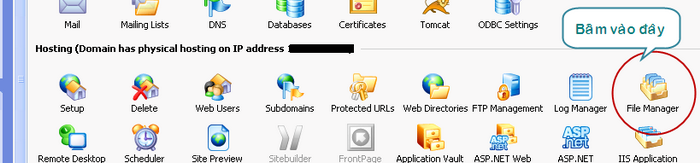
<strong>1. Sau khi đăng nhập cPanel, bấm vào biểu tượng &quot;File Manager&quot;</strong>&nbsp;(hình 1)
<div style="text-align:center"><img alt="click filem" border="0" height="163" src="https://thcstranquangkhai.edu.vn/uploads/windows/2019_03/click_filem.png" width="700" /></div>
&nbsp;<br  />
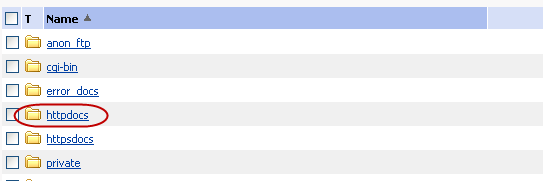
<strong>2. Website của bạn thực sự chạy từ thư mục httpdocs</strong>, đây là thiết lập mặc định của Plesk, do vậy bạn cần vào thư mục này để thực hiện các thay đổi cần thiết của mình.
<div style="text-align:center"><img alt="httpdocs" border="0" height="181" src="https://thcstranquangkhai.edu.vn/uploads/windows/2019_03/httpdocs.png" width="543" /></div>
&nbsp;<br  />
<strong>3. Chuyển đến thư mục chứa file bạn cần thay đổi quyền:</strong>&nbsp;bằng cách bấm lên các biểu tượng thư mục màu vàng. Khi thấy được file cần thiết, bấm lên biểu tượng ổ khóa để thay đổi quyền truy nhập vào file (xem hình minh họa: ở ví dụ này tôi muốn thay đổi quyền truy nhập cho thư mục &quot;images&quot;, tuy nhiên bạn có quyền thay đổi theo ý bạn và có thể thay đổi quyền cho file chứ không riêng gì thư mục).<br  />
&nbsp;
<div style="text-align:center"><img alt="chmod image" border="0" height="49" src="https://thcstranquangkhai.edu.vn/uploads/windows/2019_03/chmod_image.png" width="700" /></div>
<br  />
<br  />
Form. Thiết lập quyền truy nhập file sẽ xuất hiện như hình dưới cho phép bạn chọn chế độ quyền (CDMOH) cho file (Bước 4).<br  />
&nbsp;<br  />
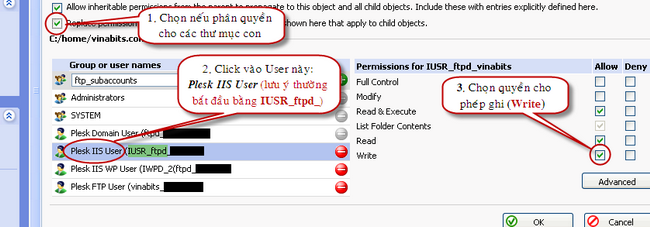
<strong>4. Đánh dấu vào từng mục quyền để lập quyền cho File.</strong>&nbsp;Một số nguyền tắt thiết lập quyền:<br  />
- Danh mục quyền: 3 quyền (đ/v file) là Đọc (Read) / Ghi (Write) / Xử lý (Execute)<br  />
- Phân làm 3 nhóm: Owner (chủ quản) / Group (những người cùng nhóm với Owner) / Others (những người khác nhóm với chủ quản).<br  />
* Người dùng khi duyệt file trên trình duyệt bị tác động bởi nhóm Others. Nếu bạn bỏ thiết lập quyền cho nhóm này thì khi truy nhập vào file sẽ hỏi (đòi) User/Pass để cho Owner hoặc Group truy nhập.<br  />
* Bạn thường thiết lập thuộc tính 777 cho 1 file để cho phép nó được ghi, điều này có nghĩa là tất cả mọi người đều có quyền ghi lên file. Tuy nhiên bạn chỉ cần set = xx7 thì file đó cũng có thể được ghi hoặc x77 vì đôi khi PHP (hay ASP...) có cái user riêng để dùng cho các lệnh ghi file.
<div style="text-align:center"><img alt="chitiet" border="0" height="227" src="https://thcstranquangkhai.edu.vn/uploads/windows/2019_03/chitiet.png" width="650" /></div>
<br  />
<strong>4. Sau khi lựa chọn quyền thích hợp, chỉ cần .............. “OK”.</strong>
		</div>
	</div>
	<div id="footer" class="clearfix">
		<div id="url">
			<strong>URL của bản tin này: </strong><a href="https://thcstranquangkhai.edu.vn/index.php/vi/windows/nukeviet/plesk-phan-quyen-chmod-file-thu-muc-339.html" title="Plesk - Phân Quyền &#40;CHMOD&#41; File&#x002F;Thư Mục">https://thcstranquangkhai.edu.vn/index.php/vi/windows/nukeviet/plesk-phan-quyen-chmod-file-thu-muc-339.html</a>

		</div>
		<div class="clear"></div>
		<div class="copyright">
			&copy; Trường thcs Trần Quang Khải
		</div>
		<div id="contact">
			<a href="mailto:phavaphu@gmail.com">phavaphu@gmail.com</a>
		</div>
	</div>
</div>
        <div id="timeoutsess" class="chromeframe">
            Bạn đã không sử dụng Site, <a onclick="timeoutsesscancel();" href="https://thcstranquangkhai.edu.vn/#">Bấm vào đây để duy trì trạng thái đăng nhập</a>. Thời gian chờ: <span id="secField"> 60 </span> giây
        </div>
        <div id="openidResult" class="nv-alert" style="display:none"></div>
        <div id="openidBt" data-result="" data-redirect=""></div>
<div id="run_cronjobs" style="visibility:hidden;display:none;"><img alt="" src="/index.php?second=cronjobs&amp;p=j79wZDhM" width="1" height="1" /></div>
<script src="https://thcstranquangkhai.edu.vn/assets/js/jquery/jquery.min.js"></script>
<script>var nv_base_siteurl="/",nv_lang_data="vi",nv_lang_interface="vi",nv_name_variable="nv",nv_fc_variable="op",nv_lang_variable="language",nv_module_name="windows",nv_func_name="savefile",nv_is_user=0, nv_my_ofs=7,nv_my_abbr="+07",nv_cookie_prefix="nv4c_y197C",nv_check_pass_mstime=1738000,nv_area_admin=0,nv_safemode=0,theme_responsive=0,nv_is_recaptcha=0;</script>
<script src="https://thcstranquangkhai.edu.vn/themes/defaultphavaphu/js/wow.js"></script>
<script src="https://thcstranquangkhai.edu.vn/themes/defaultphavaphu/js/wow.min.js"></script>
<script src="https://thcstranquangkhai.edu.vn/themes/defaultphavaphu/js/theia-sticky-sidebar.js"></script>
<script src="https://thcstranquangkhai.edu.vn/assets/js/language/vi.js"></script>
<script src="https://thcstranquangkhai.edu.vn/assets/js/global.js"></script>
<script src="https://thcstranquangkhai.edu.vn/themes/defaultphavaphu/js/news.js"></script>
<script src="https://thcstranquangkhai.edu.vn/assets/js/jquery/jquery.cookie.js"></script>
<script src="https://thcstranquangkhai.edu.vn/themes/defaultphavaphu/js/main.js"></script>
<script src="https://thcstranquangkhai.edu.vn/themes/defaultphavaphu/js/custom.js"></script>
<script type="text/javascript">
    (function(p,u,s,h){
        p._pcq=p._pcq||[];
        p._pcq.push(['_currentTime',Date.now()]);
        s=u.createElement('script');
        s.type='text/javascript';
        s.async=true;
        s.src='https://cdn.pushcrew.com/js/00454aebdd272f8e4c5a5b5e50ac4513.js';
        h=u.getElementsByTagName('script')[0];
        h.parentNode.insertBefore(s,h);
    })(window,document);
</script>
<script src="https://thcstranquangkhai.edu.vn/themes/defaultphavaphu/js/bootstrap.min.js"></script>
</body>
</html>